Tag: LLm

  • How I Built a PDF-to-Excel App with FastAPI and Gemini

    How I Built a PDF-to-Excel App with FastAPI and Gemini

    A deep dive into AI-powered document processing

    The origin story

    ZapDoc is an AI-powered document processing platform that extracts structured data from PDF documents and delivers results in Excel format via email.

    I didn’t start out wanting to build a document automation platform.

    What I wanted was leverage. I’d seen firsthand how time-consuming and painful it was to pull structured data out of messy PDFs: invoices, CVs, contracts, proposals… all needing to be manually parsed, copy-pasted, or hand-entered into Excel.

    So I asked myself: Could I build something that turns these documents into clean, structured spreadsheets, with zero effort from the user?

    After a few weekends and sleepless nights, the answer became ZapDoc, a web tool that:

    • Takes multiple PDFs or a .zip archive,
    • Lets you define which fields you want to extract (e.g. “name”, “email”, “amount”, “date”),
    • And returns a clean Excel file by email.

    It sounds simple, but the devil is in the details.

    From MVP to modular system

    I built the first prototype over a weekend: FastAPI for the backend, hosted on Railway; a minimal React frontend on Vercel; and OpenAI for field extraction.

    v0: prove it works

    The early version was rough, but functional.

    The idea was to make it free, so people would actually use it and I’d get some feedback. It had to be friction-free.

    I tested it with real CVs and invoices. I posted in indie Discords to get feedback, asking people what they’d actually use it for.

    One thing became clear: I didn’t need to support every document type. I needed to be amazing at just a few — like resumes, invoices, and RFPs.

    Iterating

    v1:

    • .zip upload support
    • Field templates (e.g., pre-fill “name” and “email” for resumes)
    • Date formatting, better validation

    v2:

    • Usage analytics (without storing docs)
    • Email capture → no sign up yet, but I you’d still need to give your e-mail address
    • Templates for RFPs and proposals

    v3:

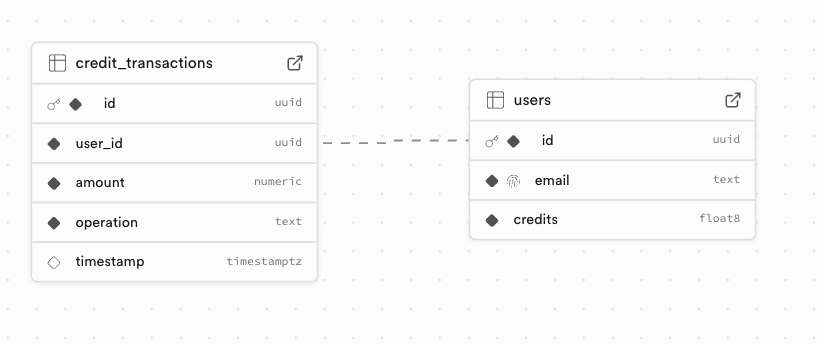
    • Auth system + Supabase-backed user DB
    • Credit management service
    • Payment flow & webhook integration
    • A cleaner, more secure pipeline

    Every iteration made it more robust, less hacky, and closer to a real SaaS.

    System Architecture (v3 overview)

    ZapDoc consists of a Vercel-hosted frontend and a Railway-hosted FastAPI backend.

    The core value proposition is simple: upload PDF documents, specify which fields you want to extract, and receive structured data in Excel format via email.
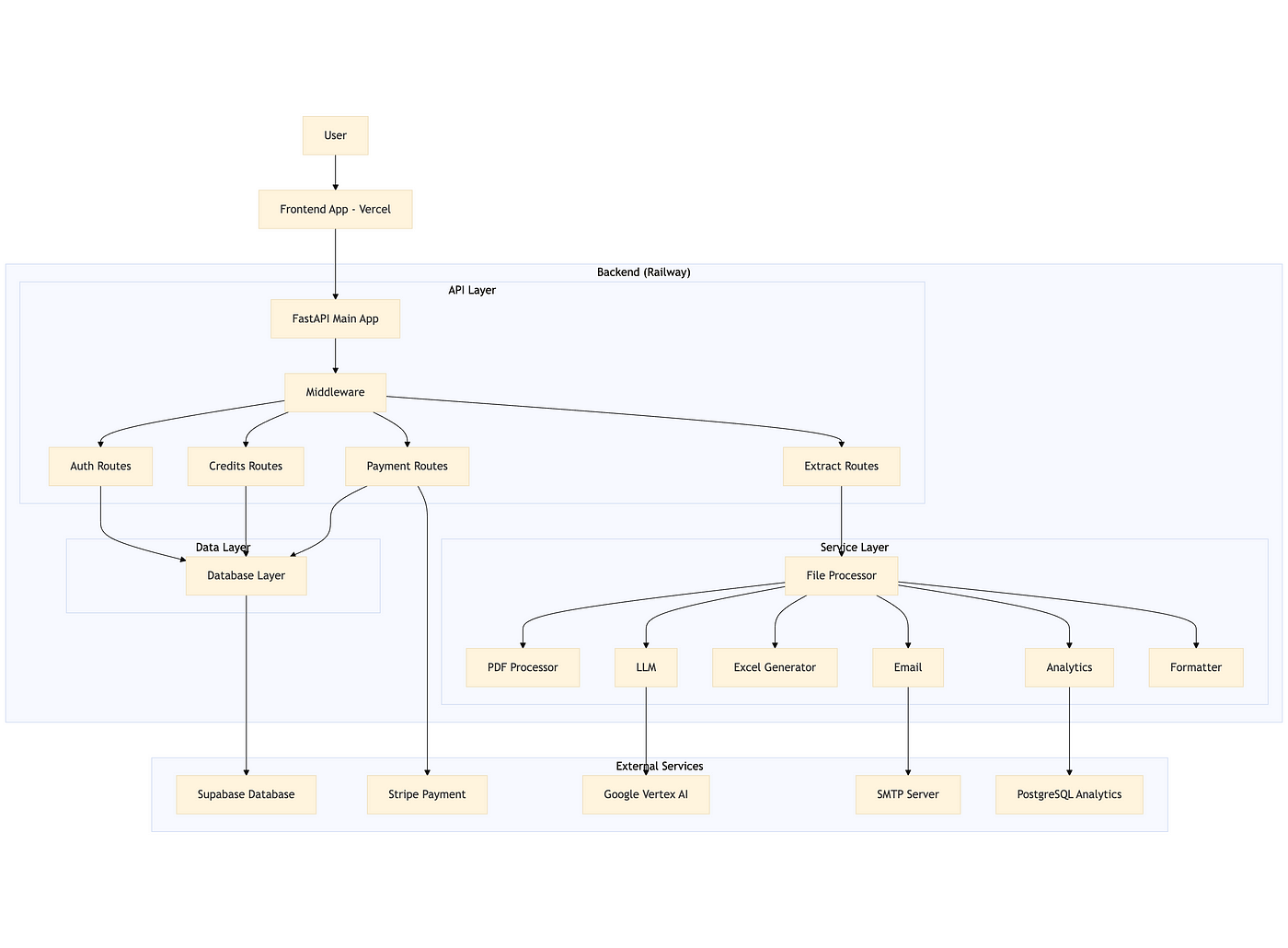
    Overview of the system design

    Technical Stack

    • Backend: FastAPI (Python) running on Railway
    • AI: Google Vertex AI (Gemini)
    • Database: Supabase (PostgreSQL)
    • Payments: Stripe
    • Frontend: React (Vercel)
    • Analytics: PostgreSQL

    Core Implementation

    1. FastAPI app

    The backend is modular, with clear separation between API routes, services, and data models.

    Middleware enforces CORS and HTTPS, and all routes are grouped by function (auth, extract, credits, payment).

    2. Authentication & authorization

    Authentication is handled via Supabase JWT tokens. The backend validates tokens on every request using a dependency-injected function, ensuring only authenticated users can access protected endpoints.

    3. Document processing pipeline

    Credit validation

    Before processing, the system checks if the user has enough credits (1 credit per page). This is done atomically to prevent race conditions, using asyncio locks and optimistic locking at the database level.

    Page counting

    The backend counts the total number of pages across all uploaded PDFs and ZIPs (containing PDFs) using PyPDF.

    PDF text extraction

    Text is extracted from each PDF using PyPDF, with robust error handling for malformed or encrypted files.

    AI-powered field extraction

    The extracted text is sent to Google Vertex AI (or OpenAI as fallback) with a prompt to extract only the requested fields. The response is parsed and validated, using the json_repair library to handle malformed JSON.

    Document classification

    For analytics, the document is also classified (invoice, receipt, contract, etc.) using the same LLM service.

    Excel generation

    Extracted data is written to an Excel file using OpenPyXL, with the first row as headers and subsequent rows as data.

    A header column is included, with the file names.

    Email delivery

    The resulting Excel file is sent to the user via SMTP, using a styled HTML template and proper attachment handling.

    4. Atomic credit operations

    All credit operations (add/spend) are atomic. The backend uses asyncio locks and checks the current credit balance before updating, retrying if a concurrent modification is detected.

    5. Payment integration

    Stripe is used for purchasing credits. The backend creates a checkout session and listens for webhook events to credit the user’s account after successful payment.

    6. Analytics

    The processed documents themselves are not stored, but the type (resume, etc.) and status (error / success) is logged to a PostgreSQL analytics database for monitoring and future insights.

    Key technical challenges & solutions

    By far, the most challenging part for me was setting up the whole thing in a way that it wouldn’t have major security flaws.

    In short, when I set the credit/payment part, I wanted to make sure that users couldn’t bypass the payment system somehow, nor get other users’ email addresses.

    Since this is the part I’m the least comfortable with, I had a lot of help from ChatGPT.

    Things like path traversal protection, user isolation, CORS, middleware, etc. are still not 100% clear to me, but this project helped me get a better understanding of them.

    Some other stuff to keep in mind

    • Race conditions: Solved with asyncio locks and optimistic DB updates.
    • LLM response robustness: Used json_repair and strict field validation.
    • PDF extraction reliability: PyPDF with error handling and support for ZIPs.
    • Performance: Async I/O, efficient batch processing, and proper resource cleanup.

    Database Schema (Supabase)
    Branding, naming & launch

    I wanted something simple, memorable, and descriptive.

    After a few brainstorms, I landed on ZapDoc, because it zaps your documents into structured data.

    The name stuck.

    I described the project to ChatGPT and asked it to draw a logo.

    Its first suggestion wasn’t amazing, but it was good enough, so I kept it:

    Then came the social and launch planning: Medium, LinkedIn, X, Bluesky, Discord, Uneed, Product Hunt… I’m still rolling that out now.

    To get some validation for the product, I launched this free version and even ran some Google Ads campaigns for it (~200 euros over 3 weeks)
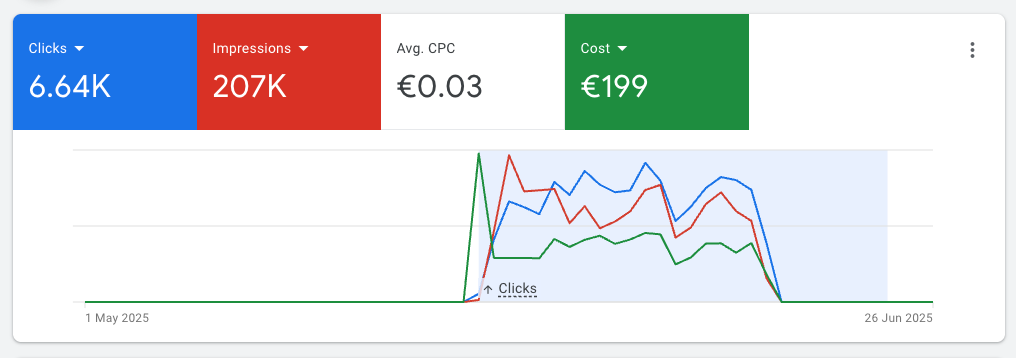
    That brought a lot of people to the tool, but not many users:

    Plus, I saw that once the ads stopped, traffic was basically over.

    This indicates that people who tried it before didn’t really stick to it.

    Either the tool is not useful, or I’m not reaching the right people.

    What I learned (so far)

    • Start with a niche: you can’t beat GPT-4 at “generic doc parsing”, but you can win at “extract line items from French invoices”.
    • Atomicity matters: especially when money is involved.
    • AI output isn’t perfect: you need robust validation & formatting layers.
    • Building is much easier than selling: it became much easier to build powerfull tools with the help of AI. Making people pay for them is much harder than I expected.

    To be honest, I’m still struggling with the niche part: from the usage stats, it seems that most people use it to parse CVs (I thought it would be contracts). But that’s still too generic, so I’ll try to narrow it down once I get more usage data.

    What’s next

    For v4 and beyond, I’ll try to run ads again (but put less money this time), to see if now people are willing to actually sign up and pay.

    If that happens, then I’ll work on some more technical improvements. Some ideas I have in mind for this:

    • Move logs from Railway to Supabase for better observability
    • Expose an API, so people can integrate it into their own tools
    • Add more document types (contracts, tenders)
    • Allow users to store custom lists of fields

    Final thoughts

    ZapDoc is still small.

    But it works, and it helped me learn a lot of useful stuff.

    Now, I want to crack the sales part, so I can help real users automate real work.

    If you’re building with LLMs, don’t chase the hype. Solve a boring problem really well.

    Make it work, then make it pretty.

    That’s what I’m trying to do.

    You can test it here: https://zap-doc.vercel.app/

    Let me know what you think. Always happy to chat.

    Feel free to reach out to me if you would like to discuss further, it would be a pleasure (honestly):


  • Query2doc: Improve your RAG by expanding Queries

    Query2doc: Improve your RAG by expanding Queries

    Most query expansion methods either dig through feedback from initial search results or rely on pre-defined thesauruses. Query2doc skips both.

    Instead, it uses LLMs to generate short, relevant pseudo-documents and appends them to your query — no retraining, no architecture changes.

    How It Works

    1. Use few-shot prompting (4 examples) to generate a passage based on a query.
    2. Combine the original query and the LLM-generated text:
    • For BM25: repeat the query 5 times, then add the pseudo-doc.
    • For dense retrievers: simple [query] [SEP] [pseudo-doc].

    Why It Matters

    • +15% nDCG@10 boost for BM25 on TREC DL.
    • Also improves dense models like DPR, SimLM, and E5 — even without fine-tuning.
    • Works best with bigger models — GPT-4 outperforms smaller ones.
    • Crucially, the combo of original query + pseudo-doc works better than either alone.

    Limitations

    • Latency: >2 seconds per query — too slow for real-time.
    • Cost: ~550k LLM calls = ~$5K.
    • LLMs can hallucinate. Still need validation layers for production.

    Takeaway

    Query2doc is dead simple but surprisingly effective. It’s a plug-and-play upgrade for search systems — ideal for boosting retrieval quality when training data is scarce.

    Just don’t expect real-time speed or perfect factual accuracy.

    Example

    import chromadb
    import openai
    import os
    
    # Set your OpenAI API key
    openai.api_key = os.getenv("OPENAI_API_KEY")
    
    # Step 1: Few-shot prompt template
    def generate_pseudo_document(query):
        prompt = f"""
          Write a passage that answers the given query.
          
          Query: what state is zip code 85282
          Passage: 85282 is a ZIP code located in Tempe, Arizona. It covers parts of the Phoenix metro area and is known for being home to Arizona State University.
          
          Query: when was pokemon green released
          Passage: Pokémon Green was released in Japan on February 27, 1996, alongside Pokémon Red. These games were the first in the Pokémon series.
          
          Query: {query}
          Passage:"""
    
        response = openai.ChatCompletion.create(
            model="gpt-3.5-turbo",
            messages=[{"role": "user", "content": prompt}],
            max_tokens=150,
            temperature=0.7,
        )
    
        return response.choices[0].message["content"].strip()
    
    # Step 2: Initialize Chroma and add documents
    client = chromadb.Client()
    collection = client.create_collection("my_docs")
    
    docs = [
        "Pokémon Green was released in Japan in 1996.",
        "Tempe, Arizona has ZIP code 85282.",
        "Randy Newman sings the Monk theme song.",
        "HRA is employer-funded; HSA is individually owned and tax-free."
    ]
    
    collection.add(
        documents=docs,
        ids=[f"doc_{i}" for i in range(len(docs))]
    )
    
    # Step 3: Expand user query
    user_query = "when was pokemon green released"
    pseudo_doc = generate_pseudo_document(user_query)
    expanded_query = f"{user_query} {pseudo_doc}"
    
    # Step 4: Run ChromaDB search
    results = collection.query(
        query_texts=[expanded_query],
        n_results=2
    )
  • Why Your RAG Isn’t Working

    Why Your RAG Isn’t Working

    And what to do about it


    Retrieval-Augmented Generation (RAG) was supposed to fix everything. More accurate answers. Less hallucination. Instant access to domain-specific knowledge.

    But in real-world deployments, the results often disappoint.

    Answers feel off. Retrievals are irrelevant. Context seems lost. So what’s going wrong?

    Let’s break down the core problems, and how to fix them.

    1. Vector embeddings aren’t magic

    RAG relies on vector embeddings to find semantically similar documents. But embeddings aren’t perfect.

    They compress language into fixed-length vectors and, in that compression, nuance gets lost.

    The issues:

    • Polysemy: One word, multiple meanings. Embeddings may pick the wrong sense.
    • Synonymy: Different words, same meaning — but often not close enough in vector space.
    • Dense mapping: Common terms dominate, drowning out contextually relevant ones.
    • Lossy compression: Some information simply disappears during vectorization.
    • Fragmented meaning: Chunking documents too finely can split up important context.

    Bottom line: vector similarity ≠ true relevance.

    2. Your query might be the problem

    If your query is too vague, you’ll get shallow matches.

    Too specific? You risk missing relevant documents that use slightly different phrasing.

    Fix it with:

    • Query rephrasing: Reformulate user queries before embedding them, to better align with how data is structured.
    • Disambiguation: Make sure the model understands what you actually mean (replacing acronyms, etc.)
    • Context tuning: Keep queries focused and information-rich — not bloated or ambiguous.

    Your retrieval is only as smart as your query.

    3. Your chunking strategy is hurting you

    Chunking is more than just splitting text. It’s a balancing act.

    Too small, and you lose context. Too large, and you overload the model.

    Strategies to explore:

    • Sliding window: Maintains continuity across chunks.
    • Recursive chunking: Uses document structure (headings, paragraphs) to guide splits.
    • Semantic chunking: Groups based on meaning, not just tokens.
    • Hybrid chunking: Combines multiple methods, customized per use case.

    The right chunking strategy depends on your data and your goals.

    4. You’re missing Named Entity Filtering (NEF)

    Named Entity Recognition (NER) isn’t just for tagging people and places.

    It can drastically sharpen your retrievals by filtering documents based on entity-level relevance.

    Use it to:

    • Filter results to only include documents with relevant entities.
    • Refine embeddings by focusing on entity-rich sentences.
    • Reduce noise and boost relevance, especially for technical or domain-specific content.

    Pair this with noun-phrase disambiguation, and you’ll see a big drop in hallucinations.

    5. You’re using embeddings too early

    Embeddings are great, but don’t make them do all the work upfront.

    Sometimes, traditional keyword matching or metadata filtering gives a cleaner first pass. Use vector embeddings to rerank or refine after that.

    Think hybrid:

    • Start with keyword or synonym-based retrieval.
    • Apply vector search as a second pass.
    • Fine-tune embeddings for your domain for even better alignment.

    Precision + semantic recall = better results.

    6. You’re not using advanced RAG techniques

    RAG has evolved. Basic setups won’t cut it anymore.

    Try these:

    • Reranking: Cross-encoders to reassess document relevance.
    • Query expansion: Add synonyms, related terms, or constraints.
    • Prompt compression: Strip irrelevant content before feeding it to the model.
    • Corrective RAG (CRAG): Evaluate and refine retrieved documents dynamically.
    • RAG Fusion: Generate multiple queries and fuse their results for broader coverage.
    • Contextual Metadata Filtering RAG (CMF-RAG): Automatically generate metadata filters from the user query.
    • Enrich documents with context: When chunking, add a summary of the page or document, for context.

    Use what fits your data and needs. There’s no one-size-fits-all.

    Putting it all together

    How do you know what will work for your use case?

    Set up automated tests:

    1. Define a batch of 50–100 relevant questions
    2. Use an LLM as evaluator
    3. Iterate through different chunking strategies, hyperparameters, type of search, etc. and store results
    4. Analyze results and choose the best setup

    Final thoughts

    RAG isn’t broke, it’s just misunderstood.

    It’s easy to slap vector search on top of an LLM and call it a day.

    But building a high-performance RAG system takes more.

    • Tune your queries.
    • Chunk your documents wisely.
    • Filter with entities.
    • Rerank with smarter models.
    • Layer retrieval techniques strategically.

    In short: stop treating retrieval as an afterthought.

    It’s half the battle.

    And often the one you’re losing.


    Feel free to reach out to me if you would like to discuss further, it would be a pleasure (honestly):

  • Build a Game Generator with AI

    Build a Game Generator with AI

    Introduction

    Why use AI for game development?

    Because it’s fast, fun, and wildly creative. You go from idea to game in seconds. Great for prototyping, learning, or impressing your friends at brunch.

    Imagine typing “a Flappy Bird clone” and watching it pop open in your browser — ready to play. No design. No dev work. Just vibes and velocity.

    What You’ll Need

    Prerequisites

    • Python 3.9+
    • An OpenAI API key
    • Curiosity

    Setting up your environment

    pip install openai python-dotenv

    Create a .env file and drop in your key:

    OPENAI_API_KEY=your-key-goes-here

    Tutorial

    Step 1 — Import required Python libraries

    from openai import OpenAI
    import ast
    import webbrowser
    import dotenv
    import pathlib

    These do the heavy lifting: API calls, browser opening, env loading, and safe data parsing.

    Step 2 — Load environment variables with dotenv

    dotenv.load_dotenv()

    Keeps your API key safe and tidy. No need to hardcode secrets.

    Step 3 — Set up the OpenAI client

    client = OpenAI()

    Boom. You’re connected to OpenAI’s LLMs.

    Step 4 — Create a function to call the LLM

    def call_llm(system_prompt: str, user_prompt: str) -> str:
    response = client.chat.completions.create(
    model=”o3-mini”,
    messages=[
    {“role”: “system”, “content”: system_prompt},
    {“role”: “user”, “content”: user_prompt},
    ],
    temperature=1,
    top_p=1,
    response_format={“type”: “json_object”},
    )
    return ast.literal_eval(response.choices[0].message.content.strip())

    The importance of system vs. user prompts

    • System = the brain’s role.
    • User = the actual task.

    Use both. Be specific.

    How to parse JSON safely with ast.literal_eval

    Don’t just eval. That’s dangerous. ast.literal_eval is safer and stricter.

    Step 5 — Generate the game code using your prompt

    def create_game_code(game_name: str) -> str:
    prompt = f”””
    You are a game developer.
    You are given a game name.
    Create code for that game in JavaScript, HTML, and CSS (all in one file).
    The game should be a simple game that can be played in the browser.
    It should be a single page game.
    Follow a json schema for the response: {{“game_code”: “game code”}}
    By default, use the html extension.
    “””
    response = call_llm(prompt, game_name)
    return response[“game_code”]

    Crafting the right system prompt

    Talk to the LLM like it’s a dev on your team. Clear, structured, and friendly.

    Step 6 — Save the generated game as HTML

    def create_game_html(game_code: str):
    with open(“game.html”, “w”) as file:
    file.write(game_code)

    Simple write-to-file. Now it exists on your machine.

    Step 7 — Automatically open the game in the browser

    def open_game():
    path = pathlib.Path().resolve() / “game.html”
    webbrowser.open(f”file://{path}”)

    No need to hunt for the file. It just opens.

    Step 8 — Tie it all together in one function

    def play_game():
    request = input(“Enter a game name: “)
    game_code = create_game_code(game_name=request)
    create_game_html(game_code)
    open_game()

    if __name__ == "__main__":
    play_game()

    Just run it. Type something fun like “Zombie Runner.” Boom. You’re playing it.

    Test it out

    Suggested prompts to try

    • “Snake but it gets faster over time”
    • “Tetris in grayscale”
    • “A ghost catching game”
    • “Mouse maze challenge”

    Try weird stuff too. The model gets creative.

    Final thoughts

    This isn’t just a coding shortcut — it’s a creative launchpad. You can brainstorm, prototype, and even teach kids how code becomes experience.

    The combo of Python + OpenAI is like a magic wand for your imagination.

    So next time someone says “Let’s build a game!”, just smile and say “Give me 30 seconds.”

    Feel free to reach out to me if you would like to discuss further, it would be a pleasure (honestly):

  • System Design for AI Engineers

    System Design for AI Engineers

    A pragmatic approach for interviews


    I’ve been studying system design on my own and I feel that, as data scientists and AI engineers, we don’t see it enough.

    At the beginning I was a bit lost, didn’t know many of the terms used in the domain.

    I watched many Youtube tutorials, and most of them go into a level of detail that can be overwhelming if you’re not a software engineer.

    Yet, many AI engineering jobs these days have a system design step in the recruiting process.

    So, I thought it’d be a good idea to give an overview of what I’ve learned so far, focused on AI engineering.

    This tutorial will be focused on system design interviews, but of course it can also help you learn system design in general, for your job.

    I’ll be using a framework from the book “System Design Interview”, which suggests the following script for the interview:

    1. Clarifying questions
    2. Propose high level design and get buy-in
    3. Deep dive
    4. Wrap-up: refine the design

    I’ve adapted this framework to make it more linked to AI Engineering, as well as more pragmatic, by outlining what I consider to be the minimum output required in each step.

    And, for this tutorial, I took a question that I’ve seen in interviews for an AI Engineer position:

    “Build a system that takes uploaded .csv files with different schemas and harmonizes them.”

    So, let’s design!

    Clarifying questions

    In this first step, you should ask some general questions, to have a better view of the context of the problem, and some more specific ones, to define the precise perimeter you’re working on.

    More specifically, you should end this step with at least this info:

    • context
    • functional features
    • non-functional features
    • key numbers

    Context

    Ask things like:

    • who will be using this?
    • how will they be using it?
    • where they will be using it (ex.: is it just one country, or worldwide)?

    In our case, the system will be used in-company, to format multiple .csv files that come from different sources.

    Their format and schema can always be different, so we need a robust and flexible solution that handles well this variability.

    Those files will be uploaded by users, that don’t need the file right away: they just need it to be stored somewhere for later use by other systems.

    It’s a small company, and they are all more or less in the same place.

    Functional features

    These are the things the product/service should be able to do.

    In our example, there’s only one main functional feature: convert file.

    But, we can also split that into 3 steps, which will help ups design our system later:

    • upload file
    • process file
    • store file

    In a more complex app, like YouTube, functional features could be:

    • upload video
    • view video
    • search video
    • etc.

    Make sure the interviewer is onboard with these. In a real-life situation, you’d have things like authentification, account creation, etc.

    Non-functional features

    These are things that your system should consider, like: scalability, availability, latency, etc.

    In practice, there’s a few ones that you should almost always consider:

    • latency
    • availability vs. consistency

    Latency means: what’s an acceptable time for the user to get a response?

    The availability vs. consistency tradeoff refers to the idea that in a distributed system, you can’t always guarantee both that data is immediately consistent across all nodes and that it’s always available when requested — especially during network failures.

    Example: Imagine a banking app where a user transfers money from their savings to their checking account. If the system prioritizes consistency, it might temporarily block access while syncing all servers to ensure the balance is accurate everywhere. If it prioritizes availability, it might show the new balance immediately — even if some servers haven’t updated yet — risking temporary inconsistencies.

    In some services, availability is more important. In others, consistency is more important.

    Don’t look at this at the system level, but at the level of each functional feature.

    Our use case is very simple, with only one functional feature, and the choice between consistency and availability will depend on the type of data and how it’s used, so check with the interviewer.

    For the latency, let’s assume anything under 1 minute is acceptable.

    Key numbers

    This will help you calculate the amount of data that goes through your system, as well as the storage needs.

    In our use case, some important figures could be:

    • daily active users (ex.: 100)
    • files per user (ex.: 1)
    • average file size (ex.: 1 MB)

    With these 3 numbers, you can already estimate the data volume:

    • daily: 100 x 1 x 1 MB = 0.1 GB
    • yearly: 0.1 GB x 365 = 36.5 GB

    Those numbers will help us choose the best solutions for processing and storage.

    For this example, let’s also assume there isn’t huge variance in the file size (there won’t be files over 10 MB).

    Propose high-level design and get buy-in

    With all this in hands, it’s time to start designing.

    The minimal output here would be:

    • core entities
    • overall system design
    • address functional requirements

    A single server design is a reasonable starting point for most use cases.

    So, start with a user, a server, services and databases.

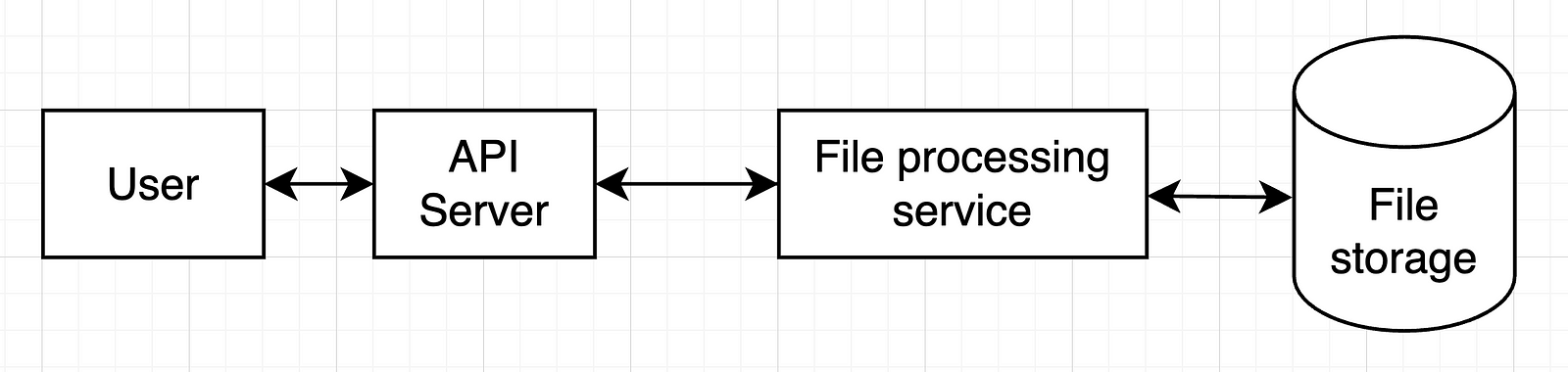
    In our example, we can start with only one service, so the whole setup would look like this:

    In a more complex system, we’d have more services and more databases.

    Check with your interviewer if they’re OK with this and move on.

    Deep dive

    Now it’s time to detail the most important components of our previous design. That’s obviously the file processing service.

    The minimal output:

    • address non-functional requirements

    But it’s also good to have these (check with the interviewer what they are expecting):

    • API detail
    • data schema detail
    • tool choices

    In our case, we should think in more detail on how those files would be processed.

    My approach here (since we’re focused on AI solutions) is to use an LLM for this:

    1. Give the LLM a “gold standard” format for our .csv files (column names and formats)
    2. Give it a sample of the file to transform too (column names and formats)
    3. Ask it for code that converts the file into the desired format
    4. Run that code on the uploaded file
    5. Store the resulting file

    With this approach in mind, we can then look back into our design and what changes we should make to it:

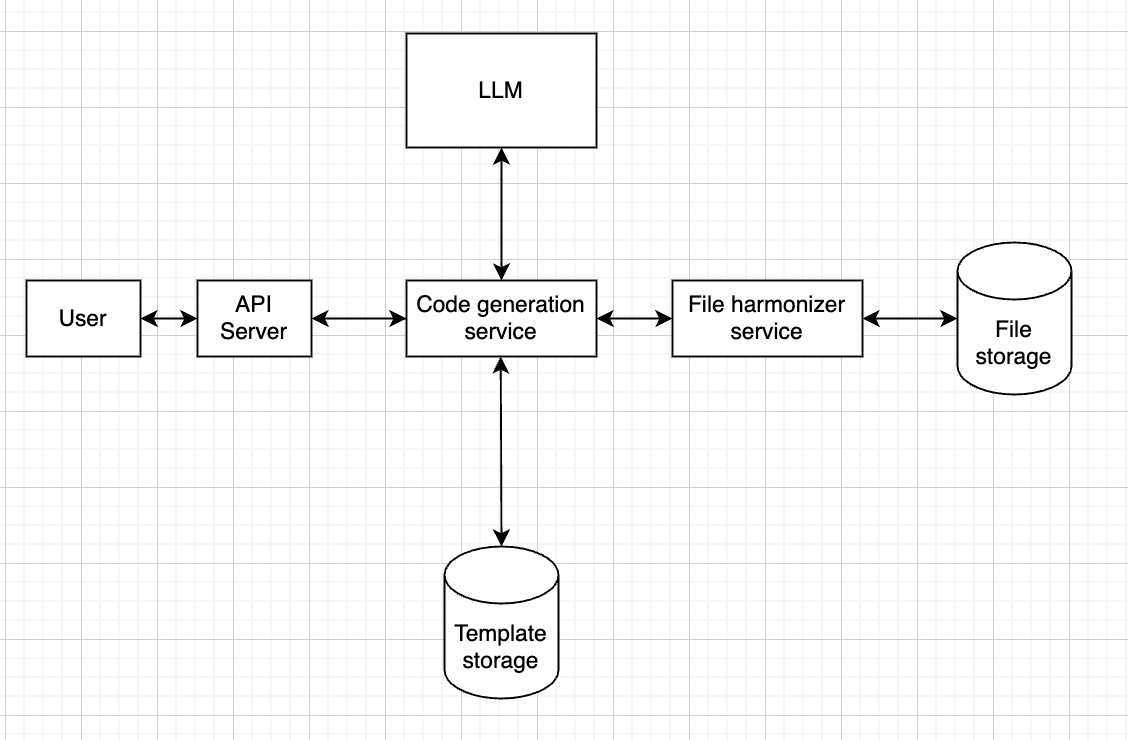
    1. We should probably separate code generation from code running, since these serve completely different purposes
    2. There might be times when we get a file schema that we’ve seen already. In that case, we can have some sort of storage that allows us to cache code used before.

    This would result in something like this:

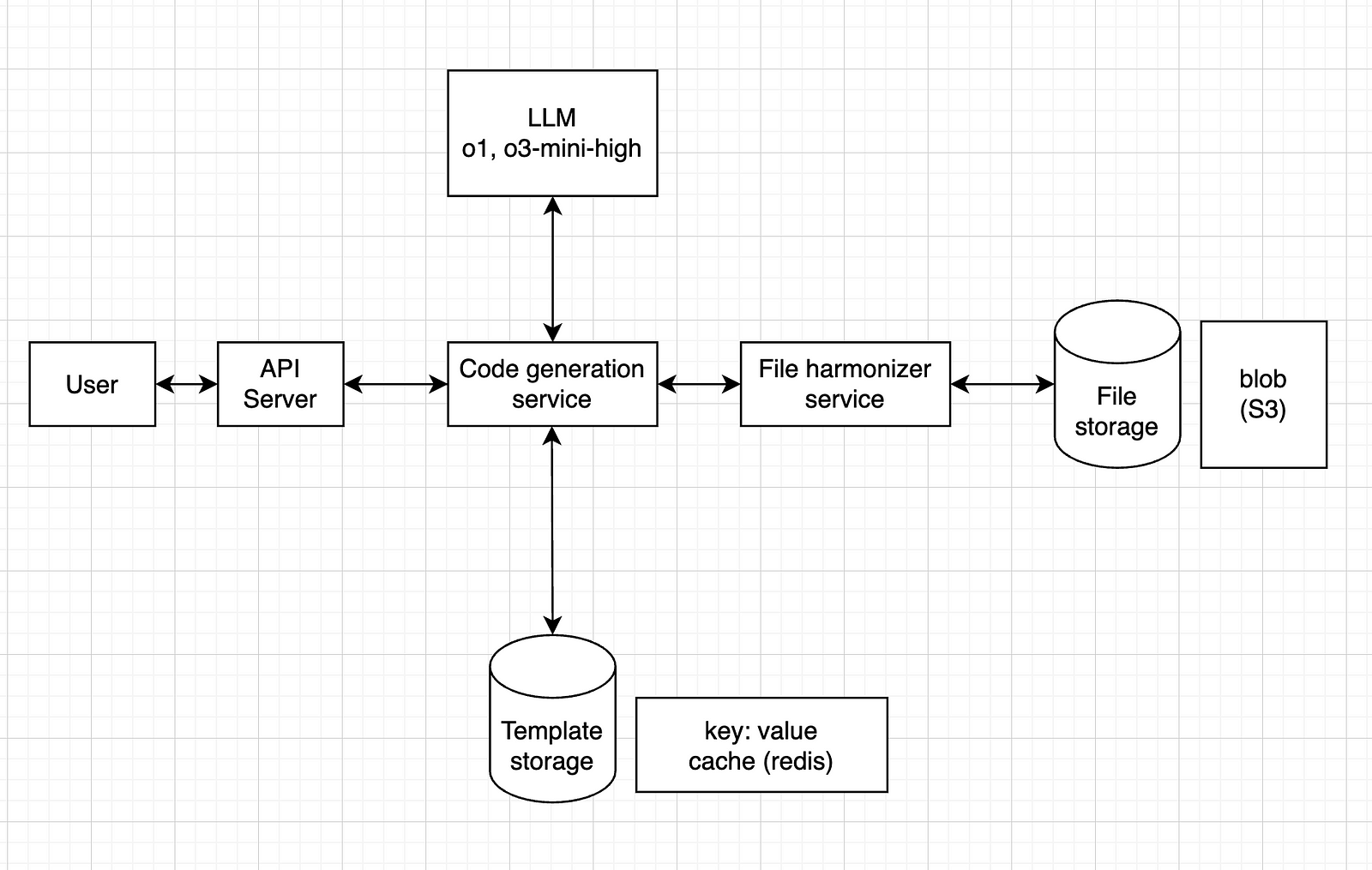
    Meaning that the code generation service will first check in “template storage” if we have seen this format before.

    If so, it will fetch the code from that storage and send it to the file harmonizer service. 

    If not, then it will call the LLM.

    Now, one of the non-functional requirements was a latency under 1 minute.

    Given the average file sizes, it’s reasonable to assume the whole thing will take less than 1 minute to run.

    In terms of technical choices, a few things are relevant here:

    • the type of model
    • the type of storage

    For the model, any model should do it, but I think it’s safer to go for a reasoning model, such as o1 or o3-mini-high.

    For the file storage, since it’s just .csv files, a blob storage service like Amazon S3 should work.

    For the template storage, we could have a key: value system, where the key is the schema (or a hash version of it) and the value is the corresponding code (or maybe a path to a blob storage with the .py file). One tool that can do this is Redis.

    So, our final design would look like this:

    Wrap up

    In this step, we can refine our design, or at least find improvement opportunities.

    Essentially, show what could be improved if you had more time.

    In our case, here are some examples:

    • a first iteration loop: what happens if the code fails to run? How do we call the LLM again, with the error message, to ask for new code?
    • a fallback system: if the code fails n times in a row, how can we make sure it stops trying, and gives some error message to the user, instead of running an infinite loop?
    • backup: how can we make sure our file storage has some sort of backup?
    • simultaneous requests: how can we handle cases where multiple users upload at the same time? Should we use a message queue system?

    The idea is to find bottlenecks, single points of failure and things like that, to improve on.

    Conclusion and additional resources

    I’ve seen many resources on system design interviews, and most of them are focused on software engineers, with very complex systems, addressing things that are usually not handled by AI engineers.

    Yet, when the interview is for an AI engineer role, the request can often be more like this one: instead of multiple services and use cases, a sort of linear processing system, focused on LLMs, etc.

    I’ve read two books on the topic:

    “System Design Interview” is more generic, and I found it more useful, giving an overview of how to approach these interviews.

    “Generative AI System Design Interview” is more focused on building things from scratch (LLMs, image generation models, etc.), which is not as common as using external APIs.

    If you’re more into courses, I can recommend these two:

    If you want a more detailed post on the topic, I found this one really useful:

    It goes straight to the point, with very practical advice.

    And, if you prefer video format, I did one for this tutorial as well:

    That’s it, I hope this was useful for you.

    I’m not an expert in system design, and I’m aware that the design I propose above can be improved in many ways.

    I just wanted to share what I’ve learned so far, focusing more on AI.

    Let me know in the comments if you’d do anything different, or if you see any major flaws in that design.


    Feel free to reach out to me if you would like to discuss further, it would be a pleasure (honestly):
  • How to Fine-Tune an LLM with Hugging Face + LoRA

    How to Fine-Tune an LLM with Hugging Face + LoRA

    Fine-tuning is the process of taking a pre-trained model and adjusting it on a specific dataset to specialize it for a particular task.

    Instead of training a model from scratch (which is costly and time-consuming), you leverage the general knowledge the model already has and teach it your domain-specific patterns.

    It’s like giving a well-read intern a crash course in your company’s workflow — faster, cheaper, and surprisingly effective.

    LoRA (Low-Rank Adaptation) is a clever trick that makes fine-tuning large models much more efficient.

    Instead of updating the entire model (millions or billions of parameters), LoRA inserts a few small trainable matrices into the model and only updates those during training.

    Think of it like attaching a lightweight lens to a heavy camera — you adjust the lens, not the whole system, to get the shot you want.

    Under the hood, LoRA works by decomposing weight updates into two smaller matrices with a much lower rank (hence the name).

    This dramatically reduces the number of parameters you need to train — without sacrificing performance.

    It’s a powerful way to customize large models on modest hardware, and it’s part of why AI is becoming more accessible beyond big tech labs.

    The dataset

    For this tutorial, I’ve decided to use Paul Graham’s blog to build a dataset with his essays.

    I really like his style of writing, and thought it’d be cool to have a fine-tuned model that mimics it.

    To build the dataset, I scraped his blog, then reverse-engineered the prompts that could have been used to write his essays.

    This means I gave each of his essays to ChatGPT and asked what prompt could have been used to generate it.

    This resulted in a dataset containing a prompt and an essay, which we’ll use to fine-tune our model.

    Now, let’s build!

    Tutorial

    Start by installing stuff:

    !pip install bitsandbytes
    !pip install peft
    !pip install trl
    !pip install tensorboardX
    !pip install wandb
    • bitsandbytes: efficient 8-bit optimizers for reducing memory usage during training
    • peft: lightweight fine-tuning methods like LoRA for large language models
    • trl: tools for training LLMs with reinforcement learning (e.g. PPO, DPO)
    • tensorboardX: TensorBoard support for PyTorch logging and visualization
    • wandb: experiment tracking and model monitoring with Weights & Biases

    Next, let’s preprocess our data:

    from enum import Enum
    from functools import partial
    import pandas as pd
    import torch
    import json

    from transformers import AutoModelForCausalLM, AutoTokenizer, set_seed
    from datasets import load_dataset
    from trl import SFTConfig, SFTTrainer
    from peft import LoraConfig, TaskType
    import os

    seed = 42
    set_seed(seed)

    # Put your HF Token here
    os.environ['HF_TOKEN']="<your HF token here>" # the token should have write access

    model_name = "google/gemma-3-1b-it"
    dataset_name = "arthurmello/paul-graham-essays"
    tokenizer = AutoTokenizer.from_pretrained(model_name)

    tokenizer.chat_template = "{{ bos_token }}{% if messages[0]['role'] == 'system' %}{{ raise_exception('System role not supported') }}{% endif %}{% for message in messages %}{{ '<start_of_turn>' + message['role'] + '\n' + message['content'] | trim + '<end_of_turn><eos>\n' }}{% endfor %}{% if add_generation_prompt %}{{'<start_of_turn>model\n'}}{% endif %}"
    def preprocess(sample):
    prompt = sample["prompt"]
    response = sample["response"]

    messages = [
    {"role": "user", "content": prompt},
    {"role": "assistant", "content": response}
    ]

    return {"text": tokenizer.apply_chat_template(messages, tokenize=False)}

    dataset = load_dataset(dataset_name)
    dataset = dataset.map(preprocess, remove_columns=["prompt", "response"])
    dataset = dataset["train"].train_test_split(0.1)

    Here, we set up the environment for fine-tuning a chat-style language model using LoRA and Google’s Gemma model.

    We then format the answers to have a “text” field, containing both the prompts and the responses.

    The result is a train/test split of the dataset, ready for supervised fine-tuning.

    Now, we define our tokenizer:

    model = AutoModelForCausalLM.from_pretrained(model_name,
    attn_implementation='eager',
    device_map="auto")
    model.config.use_cache = False
    model.to(torch.bfloat16)

    Here, we:

    • Load the model with attn_implementation='eager', which uses a more compatible (though sometimes slower) attention mechanism useful for certain hardware or debugging.
    • Map the model to available devices (device_map="auto"), which automatically spreads the model across CPUs/GPUs as needed based on memory availability.
    • Cast the model to bfloat16, a memory-efficient format that speeds up training/inference on supported hardware (like recent NVIDIA/TPU chips).

    Next, we set up our LoRA parameters:

    rank_dimension = 16
    lora_alpha = 64
    lora_dropout = 0.1

    peft_config = LoraConfig(r=rank_dimension,
    lora_alpha=lora_alpha,
    lora_dropout=lora_dropout,
    target_modules=[
    "q_proj", "k_proj", "v_proj",
    "o_proj", "gate_proj", "up_proj",
    "down_proj"
    ],
    task_type=TaskType.CAUSAL_LM)
    • r: rank dimension for LoRA update matrices (smaller = more compression)
    • lora_alpha: scaling factor for LoRA layers (higher = stronger adaptation)
    • lora_dropout: dropout probability for LoRA layers (helps prevent overfitting)
    • target_modules : which layers we target. You don’t need to specify those individually, you can just set it to “all_linear”. However, it can be a good exercise to experiment with different layers (to check all the available layers, run print(model))

    Next, we set up our training arguments:

    username = "arthurmello" # replace with your Hugging Face username
    output_dir = "gemma-3-1b-it-paul-graham"
    per_device_train_batch_size = 1
    per_device_eval_batch_size = 1
    gradient_accumulation_steps = 4
    learning_rate = 1e-4

    num_train_epochs=10
    warmup_ratio = 0.1
    lr_scheduler_type = "cosine"
    max_seq_length = 1500

    training_arguments = SFTConfig(
    output_dir=output_dir,
    per_device_train_batch_size=per_device_train_batch_size,
    per_device_eval_batch_size=per_device_eval_batch_size,
    gradient_accumulation_steps=gradient_accumulation_steps,
    save_strategy="no",
    eval_strategy="epoch",
    logging_steps=logging_steps,
    learning_rate=learning_rate,
    max_grad_norm=max_grad_norm,
    weight_decay=0.1,
    warmup_ratio=warmup_ratio,
    lr_scheduler_type=lr_scheduler_type,
    report_to="tensorboard",
    bf16=True,
    hub_private_repo=False,
    push_to_hub=True,
    num_train_epochs=num_train_epochs,
    gradient_checkpointing=True,
    gradient_checkpointing_kwargs={"use_reentrant": False},
    packing=False,
    max_seq_length=max_seq_length,
    )

    Here, we set:

    • per_device_train_batch_size and per_device_eval_batch_size set how many samples are processed per device at each step for training and evaluation, respectively.
    • gradient_accumulation_steps allows effective batch sizes larger than memory limits by accumulating gradients over multiple steps.
    • learning_rate sets the starting learning rate for model optimization.
    • num_train_epochs defines how many times the model will see the full training dataset.
    • warmup_ratio gradually increases the learning rate during the first part of training to help stabilize early learning.
    • lr_scheduler_type="cosine" uses a cosine decay schedule to adjust the learning rate over time.
    • max_seq_length defines the maximum number of tokens per training sequence.

    Finally, we train our model:

    trainer = SFTTrainer(
    model=model,
    args=training_arguments,
    train_dataset=dataset["train"],
    eval_dataset=dataset["test"],
    processing_class=tokenizer,
    peft_config=peft_config,
    )

    trainer.train()

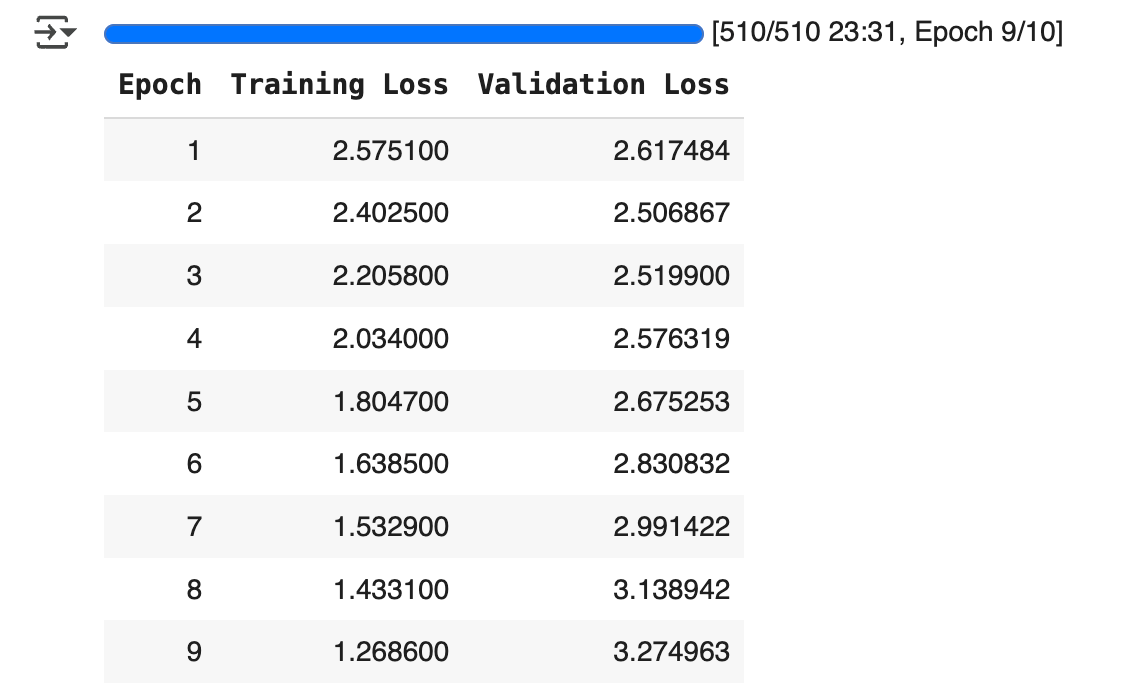
    Here, you should see something that looks like this:

    This shows the training and validation loss for each epoch.

    If training loss decreases and validation loss increases, this indicates overfitting (which we can see here around epoch 3).

    Some strategies to adress overfitting include:

    • reducing learning_rate
    • increasing lora_dropout
    • reducing num_train_epochs

    Once you’re satisfied with the training results, you can compare your model’s output with the base model’s:

    base_model = AutoModelForCausalLM.from_pretrained(model_name).to(torch.bfloat16)
    base_tokenizer = AutoTokenizer.from_pretrained(model_name)

    fine_tuned_model = model
    fine_tuned_tokenizer = tokenizer

    # Example input prompt
    prompt = "<start_of_turn>user\Write an essay on the future of AI<end_of_turn><eos>\n<start_of_turn>model\n"

    # Inference helper
    def generate(model, tokenizer, prompt):
    device=model.device
    inputs = tokenizer(prompt, return_tensors="pt").to(device)
    output = model.generate(**inputs)
    return tokenizer.decode(output[0], skip_special_tokens=True)

    print("=== Base Model Output ===")
    print(generate(base_model, base_tokenizer, prompt))

    print("\n=== Fine-Tuned Model Output ===")
    print(generate(fine_tuned_model, fine_tuned_tokenizer, prompt))

    There you go, now you have your own fine-tuned model to replicate Paul Graham’s style!

    If you set push_to_hub=True in SFTConfig , you can call your fine-tuned model anytime, using your own username and output_id :

    model = AutoModelForCausalLM.from_pretrained(
    "arthurmello/gemma-3-1b-it-paul-graham")

    And, of course, you can adapt this approach to fine-tune LLMs for other use cases!

    A video version of this tutorial is available here:


    Feel free to reach out to me if you would like to discuss further, it would be a pleasure (honestly):
  • LLMs Predict Words. LCMs Predict Ideas.

    LLMs Predict Words. LCMs Predict Ideas.

    How Meta made AI even closer to how humans think

    Traditional language models (LLMs) process text one word at a time.

    They predict the next token based on the ones before it.

    That works well, but it’s not how humans think.

    When we write or speak, we don’t just string words together.

    We organize our thoughts into sentences, ideas, and concepts.

    That’s where Large Concept Models (LCMs) come in.

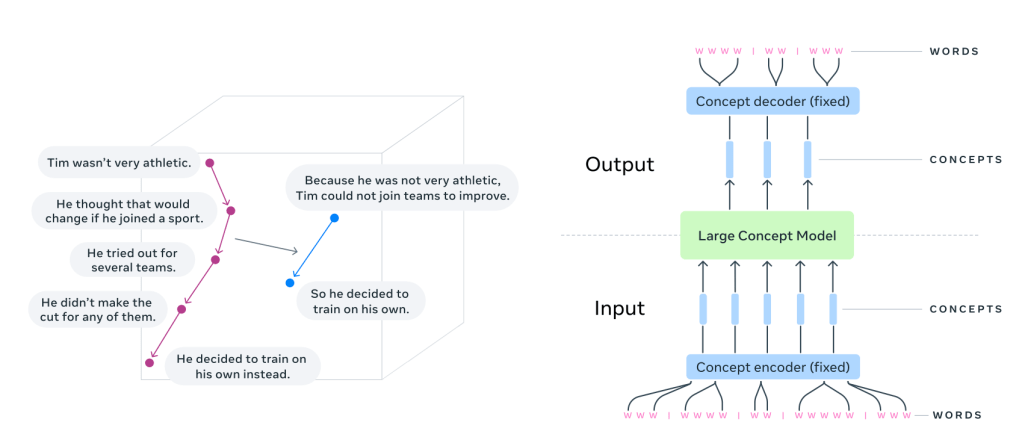
    Instead of predicting the next word, LCMs predict the next sentence.

    Each sentence is treated as a concept — a standalone unit of meaning.

    That’s a big shift.

    Why does this matter?

    LLMs operate at the token level, making them great at text generation but limited in their ability to reason hierarchically. They tend to get lost in long-form content, struggle with consistency, and often fail to keep track of structured ideas.

    LCMs take a different approach. They generate text in sentence embeddings, operating in a high-dimensional space (like SONAR) instead of token sequences. Instead of focusing on words, they predict thoughts in a way that’s language- and modality-agnostic.

    This has big implications:

    • Better context understanding — By modeling entire sentences as units, LCMs improve coherence and logical flow.
    • Multilingual and multimodal — Trained on 200+ languages, LCMs can generalize across text and speech without additional fine-tuning.
    • More efficient generation — Since they work at a higher level, they process fewer steps, making them faster and more scalable than token-based models.
    • Stronger zero-shot performance — LCMs outperform LLMs of the same size in summarization and text expansion tasks, even in languages they weren’t explicitly trained on.

    The technical shift

    LLMs generate text autoregressively, predicting one token at a time. This requires them to process long token sequences and maintain coherence through implicit context modeling.

    LCMs, on the other hand, predict the next sentence embedding in a latent space.

    Instead of raw tokens, they work with sentence representations from SONAR, a multilingual embedding model.

    SONAR is trained to encode and decode sentences across 200+ languages into and out of a single shared representation space. When an LCM needs to handle a new language or modality, only the SONAR encoder/decoder must be updated — leaving the central model untouched.

    The embeddings are processed autoregressively using diffusion models, MSE regression, or quantized representations — allowing LCMs to generalize across languages and modalities without needing explicit tokenization.

    This shift reduces computational complexity, makes it easier to edit long-form text, and allows AI to reason at a higher level of abstraction.

    The results

    When tested on summarization and summary expansion, LCMs outperformed traditional LLMs of the same size.

    They showed strong generalization across multiple languages — without additional fine-tuning.

    They handled long-form text more coherently than token-based models.

    And because they work in a modular embedding space, they can be extended to new languages, speech, or even sign language, without retraining the entire model.

    Challenges

    Sentence splitting

    LCMs rely on robust sentence segmentation. Very long or tricky “sentences” can hurt performance.

    Out-of-distribution embeddings

    With MSE or diffusion, the model could predict vectors that don’t perfectly map back to valid text. Diffusion or well-tuned quantization helps mitigate this.

    Averaging vs. sampling

    A purely MSE-based approach might average all potential continuations into a single “blurry” embedding. Diffusion or discrete codebooks allow multiple plausible completions.

    The Future of Language Modeling?

    LLMs work. But they are word-by-word prediction machines.

    LCMs take a different path — one that focuses on thoughts, not just tokens.

    By modeling language at the concept level, they bring AI closer to how humans structure ideas.

    This isn’t just an optimization. It’s a fundamental shift in how AI understands and generates language.

    And it might just change how we build the next generation of intelligent systems.

    Link to the original paper: https://arxiv.org/abs/2412.08821


    Feel free to reach out to me if you would like to discuss further, it would be a pleasure (honestly):