Category: tutorials

  • Build Your First AI Agent

    Build Your First AI Agent

    Use Hugging Face’s smolagents framework to automate customer support for a fashion store

    Introduction

    Fashion retailers receive hundreds of customer emails every day.

    Some asking about products, others trying to place orders. Manually handling these messages is time-consuming, error-prone, and doesn’t scale.

    In this project, we tackle this problem by building an AI system that reads emails, classifies their intent, and automatically generates appropriate responses.

    Our input consists of two datasets:

    • product catalog (including product IDs, names, categories, descriptions, stock levels, and seasonality)
    • customer emails (including subject and body text)

    Using these datasets, we’ll build a complete pipeline that handles both order requests and product inquiries efficiently.

    Our pipeline should process the emails, classifying them as either product inquiries or order requests, and responding accordingly:

    • if it’s an order request, it should check if the product is in stock and, if so, update the stock to deduce the requested amount
    • if it’s a product inquiry, it should fetch the information about the product

    In both cases, the agent should be able to find the right product and write an appropriate answer.

    This task combines several modern AI techniques:

    • LLM prompting for understanding and generating text
    • Retrieval-Augmented Generation (RAG) for answering queries over large product catalogs
    • Vector search (via ChromaDB) to scale efficiently
    • Agentic approach and robust workflows with smolagents

    The goal is to automate the handling of emails in a way that’s smart, production-aware, and scalable.

    Here’s the overall system architecture:
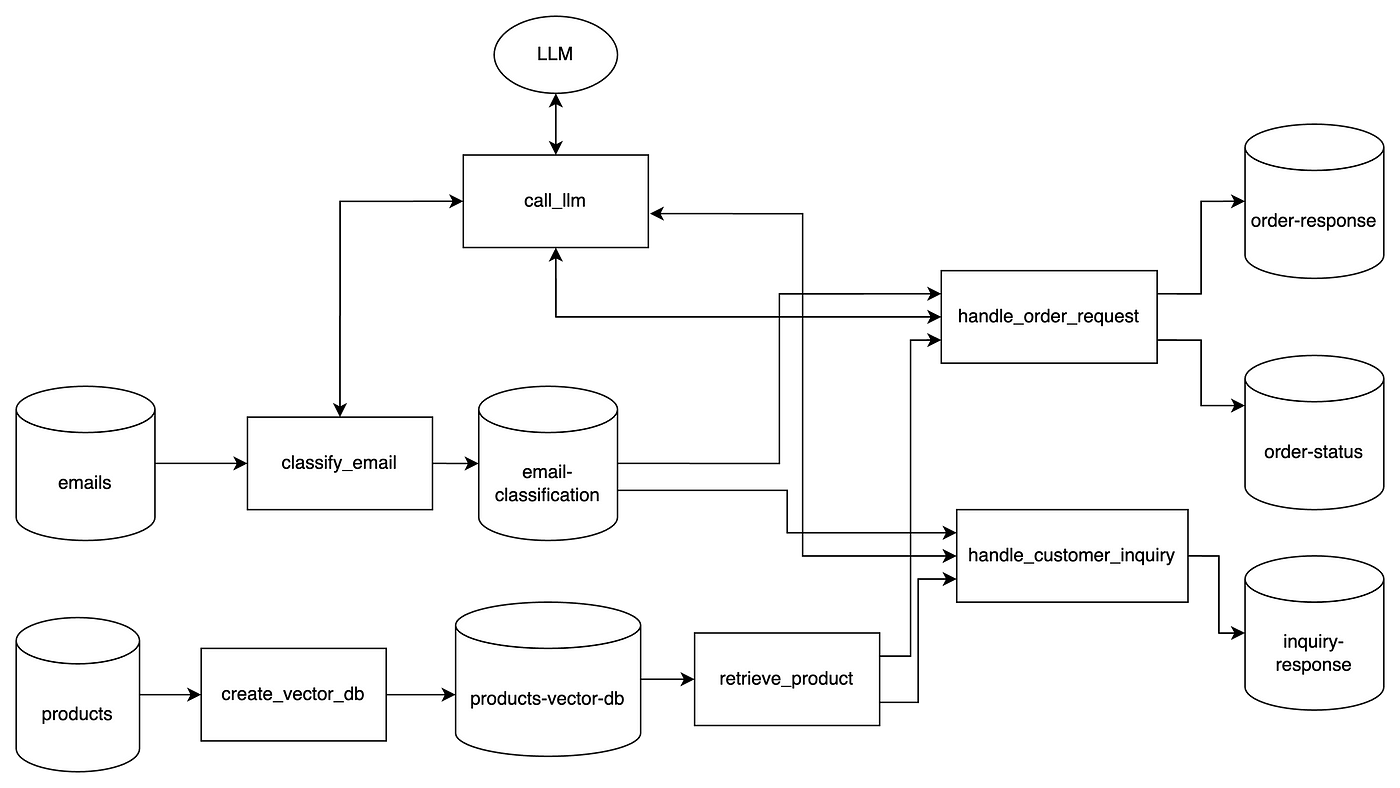
    Now, let’s start building!

    1. Setup

    In our setup, we just want to install dependencies and prepare some functions that will make our job easier later.

    Import required libraries:

    %pip install openai httpx==0.27.2 chromadb smolagents json-repair

    Prepare a call_llm function:

    from openai import OpenAI

    from google.colab import userdata
    import os

    os.environ["OPENAI_API_KEY"] = userdata.get('OPENAI_API_KEY')

    client = OpenAI()

    from pydantic import BaseModel, Field
    from typing import Dict, Optional
    import ast

    class ResponseSchema(BaseModel):
    ai_response: str = Field(..., description="AI response")


    def call_llm(
    system_prompt, user_prompt, model="gpt-4o",
    text_format=ResponseSchema):
    response = client.responses.parse(
    model="gpt-4o",
    input=[
    {"role": "system", "content": system_prompt},
    {"role": "user", "content": user_prompt}
    ],
    text_format = text_format,
    temperature=0,
    )

    return ast.literal_eval(response.output[0].content[0].text)

    Notice how we set a structured response output. This makes our function more flexible, to handle any type of request.

    Read input data:

    import pandas as pd

    products_df = pd.read_csv('products.csv')
    emails_df = pd.read_csv('emails.csv')

    2. Build the Product Vector Store

    We will embed product data using OpenAI, and store the vectors in ChromaDB. It’s a good choice for fast retrieval and setup, keeping things local.

    One very important feature here is metadata: we need to make sure this is properly set for enhanced search. For instance, ChromaDB doesn’t handle well filters on array fields, so we turn the “seasons” field into a set of boolean columns.

    import chromadb
    from chromadb.config import Settings
    from chromadb.errors import NotFoundError

    products_df["text"] = products_df[["name", "category", "description", "seasons"]].agg(" ".join, axis=1)

    def get_embedding(text):
    response = client.embeddings.create(
    input=text,
    model="text-embedding-3-small"
    )
    return response.data[0].embedding

    products_df["embedding"] = products_df["text"].apply(get_embedding)

    all_seasons = ["spring", "summer", "fall", "winter"]

    for season in all_seasons:
    products_df[season] = products_df["seasons"].apply(
    lambda x: 1 if "All seasons" in x or season in x.lower() else 0
    )

    chroma_client = chromadb.Client(Settings())

    try:
    chroma_client.delete_collection("products_openai")
    except NotFoundError:
    pass

    collection = chroma_client.create_collection("products_openai")
    metadata_cols = ["product_id", "stock", "category", "price", "winter","summer","fall","spring"]

    for i, row in products_df.iterrows():
    metadata = {
    col: row[col] for col in metadata_cols
    }

    collection.add(
    documents=[row["text"]],
    embeddings=[row["embedding"]],
    ids=[str(i)],
    metadatas=[metadata]
    )

    3. Create our agent and its first tool

    Now, to the juicy part: setting up our agent and it’s tool.

    Since we needs to be able to query our product database, we create a function called query_product_db, which takes as input a query and filters.

    For it to be a proper tool, our function needs the @tool decorator, a proper docstring, and type hints. This is what allows our agent to know exactly how to use.

    In our case, we need our agent to know exactly how to use the metadata filters in ChromaDB, so setting up a few examples is a good idea:

    from smolagents import OpenAIServerModel, ToolCallingAgent, tool
    from typing import List, Optional

    @tool
    def query_product_db(query: str,
    metadata_filter:dict | None=None,
    document_filter:dict | None=None) -> dict:
    """Retrieve the three best-matching products from the `products`
    Chroma DB vectorstore.

    Args:
    query : str
    Natural-language search term. A dense vector is generated with
    ``get_embedding`` and used for similarity search.
    metadata_filter : dict | None, optional
    A Chroma metadata filter expressed with Mongo-style operators
    (e.g. ``{"$and": [{"price": {"$lt": 25}}, {"fall": {"$eq": 1}}]}``).
    If *None*, no metadata constraints are applied.
    document_filter : dict | None, optional
    Full-text filter run on each document’s contents
    (e.g. ``{"$contains": "scarf"}``). If *None*, every document is eligible.

    Examples
    --------
    >>> get_product(
    ... "a winter accessory under 25 dollars, the id is FZZ1098",
    ... metadata_filter={
    ... "$and": [
    ... {"price": {"$lt": 25}},
    ... {"category": {"$in": ["Accessories"]}},
    ... {"winter": {"$eq": 1}},
    {"product_id""{"$eq": "FZZ1098"}}
    ... ]
    ... },
    ... document_filter={"$contains": "scarf"}
    ... )

    >>> get_product(
    ... "something for winter",
    ... metadata_filter={"winter": {"$eq": 1}}
    ... )

    Here's an overview of the product database metadata:

    product_id,name,category,description,stock,spring,summer,fall,winter,price
    RSG8901,Retro Sunglasses,Accessories,"Transport yourself back in time with our retro sunglasses. These vintage-inspired shades offer a cool, nostalgic vibe while protecting your eyes from the sun's rays. Perfect for beach days or city strolls.",1,1,1,0,0,26.99
    SWL2345,Sleek Wallet,Accessories,"Keep your essentials organized and secure with our sleek wallet. Featuring multiple card slots and a billfold compartment, this stylish wallet is both functional and fashionable. Perfect for everyday carry.",5,1,1,0,0,30
    VSC6789,Versatile Scarf,Accessories,"Add a touch of versatility to your wardrobe with our versatile scarf. This lightweight, multi-purpose accessory can be worn as a scarf, shawl, or even a headwrap. Perfect for transitional seasons or travel.",6,1,0,1,0,23

    """
    query_embedding = get_embedding(query)
    results = collection.query(
    query_embeddings=[query_embedding],
    n_results=3,
    include=["documents", "metadatas","distances"],
    where=metadata_filter,
    where_document=document_filter
    )
    return results


    product_finder_agent = ToolCallingAgent(
    tools=[query_product_db], model=OpenAIServerModel(model_id="gpt-4o")
    )

    Finally, we use ToolCallingAgent, which is suited for our use case.

    In some other cases, you might want to use CodeAgent (for example, for writing code, obviously).

    4. Email classification with LLM

    Next step is to ese GPT to classify each email as either an “order request” or “product inquiry” and store results in an email-classification dataframe.

    For this we don’t need the agent: a simple call to an LLM is enough:

    from pydantic import BaseModel, Field
    from typing import Literal

    class EmailClass(BaseModel):
    category: Literal["order_request", "customer_inquiry"] = Field(..., description="Email classification")

    def classify_email(email):
    system_prompt = """You are a smart classifier trained to categorize customer emails based on their content. Each email includes a subject and a message body.
    There are two possible categories:
    • order_request: The customer is clearly expressing the intent to place an order, make a purchase, or asking to buy something (even if casually or imprecisely).
    • customer_inquiry: The customer is asking a question, requesting information, or needs help deciding before buying.

    Classify the following emails based on their subject and message. Output only one of the two categories: order_request or customer_inquiry.
    Do not add any extra text, just the class.


    Examples:

    Email 1
    Subject: Leather Wallets
    Message: Hi there, I want to order all the remaining LTH0976 Leather Bifold Wallets you have in stock. I’m opening up a small boutique shop and these would be perfect for my inventory. Thank you!
    Category: order_request

    Email 2
    Subject: Need your help
    Message: Hello, I need a new bag to carry my laptop and documents for work. My name is David and I’m having a hard time deciding which would be better - the LTH1098 Leather Backpack or the Leather Tote? Does one have more organizational pockets than the other?
    Category: customer_inquiry

    Email 3
    Subject: Purchase Retro Sunglasses
    Message: Hello, I would like to order 1 pair of RSG8901 Retro Sunglasses. Thanks!
    Category: order_request

    Email 4
    Subject: Inquiry on Cozy Shawl Details
    Message: Good day, For the CSH1098 Cozy Shawl, the description mentions it can be worn as a lightweight blanket. At $22, is the material good enough quality to use as a lap blanket?
    Category: customer_inquiry
    """

    user_prompt = f"""
    Now classify this email:
    Subject: {email.subject}
    Message: {email.message}
    Category:
    """

    return call_llm(system_prompt, user_prompt, text_format=EmailClass)

    email_classification_df = emails_df.copy().rename(columns={"email_id": "email ID"})
    email_classification_df[['category']] = emails_df.apply(classify_email, axis=1).apply(pd.Series)
    email_classification_df = email_classification_df[['email ID', 'category']]

    set_with_dataframe(email_classification_sheet, email_classification_df)

    5. Handle order requests

    Now that everything is set up, let’s handle our first use case: dealing with order requests.

    These emails can be tricky they might mention a certain product by its name, ID, or something else. They might mention the quantity they want to buy, or things like “all you have in stock”.

    For ex.:

    Subject: Leather Wallets
    Message: Hi there, I want to order all the remaining
    LTH0976 Leather Bifold Wallets you have in stock.
    I'm opening up a small boutique shop and these would be perfect
    for my inventory. Thank you!

    So, before we deal with it, we need to extract product requests from emails using structured LLM prompts. For instance, product id and requested quantity. Since quantity might be “all you have in stock”, our agent needs access to the product database to find that information.

    Extract structured information

    Let’s start extracting structured information from the email, using our agent:

    from json_repair import repair_json

    order_requests_df = email_classification_df[email_classification_df["category"]=="order_request"]
    order_requests_df = order_requests_df.merge(emails_df, left_on="email ID", right_on="email_id")

    def extract_order_request_info(order_request):
    prompt = f"""
    Given a customer email placing a product order, extract the relevant information from it: product and quantity.
    The customer might mention multiple products, but we only need those for which they are explictly
    placing an order.


    Subject: {order_request["subject"]}
    Message: {order_request["message"]}

    answer should be in this format:
    [{{'product_id': <the product ID, in this format: 'VSC6789'>,'quantity': <an integer>}}]
    'quantity' should always be an integer. If needed, check the quantity in stock.
    If the mentioned product ID does not follow that format (ex.: it contains spaces, '-', etc.),
    clean it to follow that format (3 letters, 4 numbers, no other characters)


    Here are 2 examples of the expected output:
    Example 1:
    [{{'product_id': 'LTH0976', 'quantity': 4}}]

    Example 2:
    [{{'product_id': 'SFT1098', 'quantity': 3}}, {{'product_id': 'ABC1234', 'quantity': 1}}]

    """

    agent_response = product_finder_agent.run(prompt)

    return ast.literal_eval(repair_json(agent_response))

    order_requests_info = order_requests_df.apply(extract_order_request_info, axis=1)

    def ensure_list(val):
    if isinstance(val, list):
    return val
    elif isinstance(val, dict):
    return [val]
    else:
    return []

    order_requests_df['order_requests_info'] = order_requests_info.apply(ensure_list)

    exploded_order_requests_df = order_requests_df.explode('order_requests_info').reset_index(drop=True)
    exploded_order_requests_df['product_id'] = exploded_order_requests_df['order_requests_info'].apply(lambda x: x.get('product_id') if isinstance(x, dict) else None)
    exploded_order_requests_df['quantity'] = exploded_order_requests_df['order_requests_info'].apply(lambda x: x.get('quantity') if isinstance(x, dict) else None)

    Here’s an example of the agent’s output:

    ╭──────────────────────────────────────────────────── New run ────────────────────────────────────────────────────╮
    │ │
    │ Given a customer email placing a product order, extract the relevant information from it: product and quantity. │
    │ The customer might mention multiple products, but we only need those for which they are explictly │
    │ placing an order. │
    │ │
    │ │
    │ Subject: Leather Wallets │
    │ Message: Hi there, I want to order all the remaining LTH0976 Leather Bifold Wallets you have in stock. │
    │ I'm opening up a small boutique shop and these would be perfect for my inventory. Thank you! │
    │ │
    │ answer should be in this format: │
    │ [{'product_id': <the product ID, in this format: 'VSC6789'>,'quantity': <an integer>}\] │
    │ 'quantity' should always be an integer. If needed, check the quantity in stock. │
    │ If the mentioned product ID does not follow that format (ex.: it contains spaces, '-', etc.), │
    │ clean it to follow that format (3 letters, 4 numbers, no other characters) │
    │ │
    │ │
    │ │
    │ Here are 2 examples of the expected output: │
    │ Example 1: │
    │ [{'product_id': 'LTH0976', 'quantity': 4}\] │
    │ │
    │ Example 2: │
    │ [{'product_id': 'SFT1098', 'quantity': 3}, {'product_id': 'ABC1234', 'quantity': 1}\] │
    │ │
    ╰─ OpenAIServerModel - gpt-4o ────────────────────────────────────────────────────────────────────────────────────╯
    ━━━━━━━━━━━━━━━━━━━━━━━━━━━━━━━━━━━━━━━━━━━━━━━━━━━━━ Step 1 ━━━━━━━━━━━━━━━━━━━━━━━━━━━━━━━━━━━━━━━━━━━━━━━━━━━━━━
    ╭─────────────────────────────────────────────────────────────────────────────────────────────────────────────────╮
    │ Calling tool: 'query_product_db' with arguments: {'query': 'LTH0976 Leather Bifold Wallet'} │
    ╰─────────────────────────────────────────────────────────────────────────────────────────────────────────────────╯
    Observations: {'ids': ||'5', '1', '21']], 'embeddings': None, 'documents': ||'Leather Bifold Wallet Accessories
    Upgrade your everyday carry with our leather bifold wallet. Crafted from premium, full-grain leather, this sleek
    wallet features multiple card slots, a billfold compartment, and a timeless, minimalist design. A sophisticated
    choice for any occasion. All seasons', 'Sleek Wallet Accessories Keep your essentials organized and secure with our
    sleek wallet. Featuring multiple card slots and a billfold compartment, this stylish wallet is both functional and
    fashionable. Perfect for everyday carry. All seasons', 'Leather Backpack Bags Upgrade your daily carry with our
    leather backpack. Crafted from premium leather, this stylish backpack features multiple compartments, a padded
    laptop sleeve, and adjustable straps for a comfortable fit. Perfect for work, travel, or everyday use. All
    seasons']], 'uris': None, 'included': |'documents', 'metadatas', 'distances'], 'data': None, 'metadatas':
    ||{'fall': 1, 'winter': 1, 'summer': 1, 'stock': 4, 'price': 21.0, 'category': 'Accessories', 'spring': 1,
    'product_id': 'LTH0976'}, {'fall': 1, 'spring': 1, 'winter': 1, 'price': 30.0, 'category': 'Accessories', 'stock':
    5, 'summer': 1, 'product_id': 'SWL2345'}, {'fall': 1, 'summer': 1, 'price': 43.99, 'product_id': 'LTH1098',
    'category': 'Bags', 'stock': 7, 'spring': 1, 'winter': 1}]], 'distances': ||0.7475106716156006, 1.036144733428955,
    1.1911123991012573]]}
    [Step 1: Duration 3.41 seconds| Input tokens: 1,710 | Output tokens: 23]
    ━━━━━━━━━━━━━━━━━━━━━━━━━━━━━━━━━━━━━━━━━━━━━━━━━━━━━ Step 2 ━━━━━━━━━━━━━━━━━━━━━━━━━━━━━━━━━━━━━━━━━━━━━━━━━━━━━━
    ╭─────────────────────────────────────────────────────────────────────────────────────────────────────────────────╮
    │ Calling tool: 'final_answer' with arguments: {'answer': "[{'product_id': 'LTH0976', 'quantity': 4}]"} │
    ╰─────────────────────────────────────────────────────────────────────────────────────────────────────────────────╯

    We can see it using the query_product_db tool and reflecting on its output (for example, if the requested quantity is in stock).

    Process order

    With the structured order information in hands, we can process those orders:

    products = products_df.set_index('product_id').copy()

    def process_order_requests(exploded_order_requests_df):
    order_lines = []

    for _, row in exploded_order_requests_df.iterrows():
    email_id = row['email_id']
    product_id = row['product_id']
    quantity = row['quantity']

    if product_id in products.index:
    available_stock = products.at[product_id, 'stock']

    if available_stock >= quantity:
    status = 'created'
    products.at[product_id, 'stock'] -= quantity
    else:
    status = 'out of stock'
    else:
    status = 'out of stock'

    order_lines.append({
    'email ID': email_id,
    'product ID': product_id,
    'quantity': quantity,
    'status': status
    })

    return pd.DataFrame(order_lines), products.reset_index()

    order_status_df, updated_products_df = process_order_requests(exploded_order_requests_df)

    And, finally, use an LLM to generate a human-like response: confirm or explain stock issues, suggest alternatives.

    def write_order_request_response(message, order_status):
    system_prompt = f"""
    A customer has requested to place an order for a product.
    Write a response to them, stating if the order was created or not,
    and reinforcing the product and the quantity ordered.
    If it was out of stock, explain it to them.

    Make the email tone professional, yet friendly. You should sound human so,
    if the customer mentions something in their email that's worth referring to, do it.

    Do not add any other text, such as email subject or placeholders, just a clean email body.
    Here are 2 examples of the expected reply:

    Example 1:
    'Hi there,
    Thank you for reaching out and considering our LTH0976 Leather Bifold Wallets for your new boutique shop.
    We’re thrilled to hear about your exciting venture!
    Unfortunately, the LTH0976 Leather Bifold Wallets are currently out of stock.
    We sincerely apologize for any inconvenience this may cause.
    Please let us know if there’s anything else we can assist you with or if you’d like to explore alternative products that might suit your boutique.
    Best,
    Customer Support'

    Example 2:
    'Hi,
    Thank you for reaching out and sharing your love for tote bags!
    It sounds like you have quite the collection!
    I'm pleased to inform you that your order for the VBT2345 Vibrant Tote Bag has been successfully created.
    We have processed your request for 1 unit, and it will be on its way to you shortly.
    If you have any further questions or need assistance, feel free to reach out.
    Best,
    Customer Support'

    """

    user_prompt = f"""
    Here's the original message: {message}

    And here's the order status: {order_status}"""

    return call_llm(system_prompt,user_prompt).get("ai_response")

    def generate_order_response_record(row):
    email_id = row["email ID"]
    message = {"message": row["message"]}

    order_status = order_status_df[order_status_df["email ID"] == email_id][["product ID", "quantity", "status"]]
    status_dict = order_status.to_dict(orient="records")

    response = write_order_request_response(message, status_dict)
    return pd.Series({"email ID": email_id, "response": response})

    order_response_df = order_requests_df.apply(generate_order_response_record, axis=1)

    5. Respond to product inquiries with RAG

    Responding product inquiries requires our agent, for each email, to:

    • Use the embedded vector store to find relevant products
    • Build a compact, informative reply using only the top matches

    We can do that by giving the specific instructions to our agent, and explaining how they can use the product search to do their task:

    inquiries_df = email_classification_df[email_classification_df["category"]=="customer_inquiry"]
    inquiries_df = inquiries_df.merge(emails_df, left_on="email ID", right_on="email_id")

    def answer_product_inquiry(inquiry):
    prompt = f"""
    Your task is to answer a customer inquiry about one or multiple products.

    You should:
    1. Find the product(s) the customer refers to. This might be a specific product, or a general type of product.

    For example, they might ask about a specific product id, or just a winter coat.

    You can query the product catalog to find relevant information.
    It's up to you to understand what's the best strategy to find that product information.

    Be careful: the customer might mention other products that do not relate to their inquiry.

    Your job is to understand precisely the type of request they are making, and only query the database
    for the specific inquiry. If they mention a specific product id or type, but are not asking about those
    directly, you shouldn't look them up. Just look up information that will answer their inquiry.

    2. Once you have the product information, write a response email to the customer.

    Make the email tone professional, yet friendly. You should sound human so,
    if the customer mentions something in their email that's worth referring to, do it.

    Do not add any other text, such as email subject or placeholders, just a clean email body.

    Always sign as 'Customer Support'

    Here's an example of the expected reply:

    'Hi David,

    Thank you for reaching out!

    Both the LTH1098 Leather Backpack and the Leather Tote are great choices for work, but here are a few key differences:
    - Organization: The Backpack has more built-in compartments, including a padded laptop sleeve and multiple compartments, which make it ideal for organizing documents and electronics.
    - The Tote also offers a spacious interior and multiple pockets, but it’s slightly more open and less structured inside—great for quick access, but with fewer separate sections.

    If your priority is organization and carrying a laptop securely, the LTH1098 Backpack would be the better fit.

    Please let us know if there’s anything else we can assist you with, or if you'd like to place an order.
    Best,
    Customer Support'

    Here's the user's inquiry:
    Subject: {inquiry["subject"]}
    Message: {inquiry["message"]}

    """
    agent_response = product_finder_agent.run(prompt)
    return agent_response

    inquiries_df["response"] = inquiries_df.apply(answer_product_inquiry, axis=1)

    inquiry_response_df = inquiries_df[["email ID","response"]]

    Reflection and improvements

    Our approach doesn’t rely blindly on the agent: it leverages a hybrid approach:

    • simple Python logic + LLM calls when that’s enough
    • smolagents where sequential decision-making is needed (ex.: multi-step querying)

    For production, we would definitely need a fallback to human option, monitoring, and an evaluation dataset, to assess our agent’s performance.

    Overall, I think the smolagents framework provides a lot of flexibility, opening up many possibilities.


  • Build a Game Generator with AI

    Build a Game Generator with AI

    Introduction

    Why use AI for game development?

    Because it’s fast, fun, and wildly creative. You go from idea to game in seconds. Great for prototyping, learning, or impressing your friends at brunch.

    Imagine typing “a Flappy Bird clone” and watching it pop open in your browser — ready to play. No design. No dev work. Just vibes and velocity.

    What You’ll Need

    Prerequisites

    • Python 3.9+
    • An OpenAI API key
    • Curiosity

    Setting up your environment

    pip install openai python-dotenv

    Create a .env file and drop in your key:

    OPENAI_API_KEY=your-key-goes-here

    Tutorial

    Step 1 — Import required Python libraries

    from openai import OpenAI
    import ast
    import webbrowser
    import dotenv
    import pathlib

    These do the heavy lifting: API calls, browser opening, env loading, and safe data parsing.

    Step 2 — Load environment variables with dotenv

    dotenv.load_dotenv()

    Keeps your API key safe and tidy. No need to hardcode secrets.

    Step 3 — Set up the OpenAI client

    client = OpenAI()

    Boom. You’re connected to OpenAI’s LLMs.

    Step 4 — Create a function to call the LLM

    def call_llm(system_prompt: str, user_prompt: str) -> str:
    response = client.chat.completions.create(
    model=”o3-mini”,
    messages=[
    {“role”: “system”, “content”: system_prompt},
    {“role”: “user”, “content”: user_prompt},
    ],
    temperature=1,
    top_p=1,
    response_format={“type”: “json_object”},
    )
    return ast.literal_eval(response.choices[0].message.content.strip())

    The importance of system vs. user prompts

    • System = the brain’s role.
    • User = the actual task.

    Use both. Be specific.

    How to parse JSON safely with ast.literal_eval

    Don’t just eval. That’s dangerous. ast.literal_eval is safer and stricter.

    Step 5 — Generate the game code using your prompt

    def create_game_code(game_name: str) -> str:
    prompt = f”””
    You are a game developer.
    You are given a game name.
    Create code for that game in JavaScript, HTML, and CSS (all in one file).
    The game should be a simple game that can be played in the browser.
    It should be a single page game.
    Follow a json schema for the response: {{“game_code”: “game code”}}
    By default, use the html extension.
    “””
    response = call_llm(prompt, game_name)
    return response[“game_code”]

    Crafting the right system prompt

    Talk to the LLM like it’s a dev on your team. Clear, structured, and friendly.

    Step 6 — Save the generated game as HTML

    def create_game_html(game_code: str):
    with open(“game.html”, “w”) as file:
    file.write(game_code)

    Simple write-to-file. Now it exists on your machine.

    Step 7 — Automatically open the game in the browser

    def open_game():
    path = pathlib.Path().resolve() / “game.html”
    webbrowser.open(f”file://{path}”)

    No need to hunt for the file. It just opens.

    Step 8 — Tie it all together in one function

    def play_game():
    request = input(“Enter a game name: “)
    game_code = create_game_code(game_name=request)
    create_game_html(game_code)
    open_game()

    if __name__ == "__main__":
    play_game()

    Just run it. Type something fun like “Zombie Runner.” Boom. You’re playing it.

    Test it out

    Suggested prompts to try

    • “Snake but it gets faster over time”
    • “Tetris in grayscale”
    • “A ghost catching game”
    • “Mouse maze challenge”

    Try weird stuff too. The model gets creative.

    Final thoughts

    This isn’t just a coding shortcut — it’s a creative launchpad. You can brainstorm, prototype, and even teach kids how code becomes experience.

    The combo of Python + OpenAI is like a magic wand for your imagination.

    So next time someone says “Let’s build a game!”, just smile and say “Give me 30 seconds.”

    Feel free to reach out to me if you would like to discuss further, it would be a pleasure (honestly):

  • System Design for AI Engineers

    System Design for AI Engineers

    A pragmatic approach for interviews


    I’ve been studying system design on my own and I feel that, as data scientists and AI engineers, we don’t see it enough.

    At the beginning I was a bit lost, didn’t know many of the terms used in the domain.

    I watched many Youtube tutorials, and most of them go into a level of detail that can be overwhelming if you’re not a software engineer.

    Yet, many AI engineering jobs these days have a system design step in the recruiting process.

    So, I thought it’d be a good idea to give an overview of what I’ve learned so far, focused on AI engineering.

    This tutorial will be focused on system design interviews, but of course it can also help you learn system design in general, for your job.

    I’ll be using a framework from the book “System Design Interview”, which suggests the following script for the interview:

    1. Clarifying questions
    2. Propose high level design and get buy-in
    3. Deep dive
    4. Wrap-up: refine the design

    I’ve adapted this framework to make it more linked to AI Engineering, as well as more pragmatic, by outlining what I consider to be the minimum output required in each step.

    And, for this tutorial, I took a question that I’ve seen in interviews for an AI Engineer position:

    “Build a system that takes uploaded .csv files with different schemas and harmonizes them.”

    So, let’s design!

    Clarifying questions

    In this first step, you should ask some general questions, to have a better view of the context of the problem, and some more specific ones, to define the precise perimeter you’re working on.

    More specifically, you should end this step with at least this info:

    • context
    • functional features
    • non-functional features
    • key numbers

    Context

    Ask things like:

    • who will be using this?
    • how will they be using it?
    • where they will be using it (ex.: is it just one country, or worldwide)?

    In our case, the system will be used in-company, to format multiple .csv files that come from different sources.

    Their format and schema can always be different, so we need a robust and flexible solution that handles well this variability.

    Those files will be uploaded by users, that don’t need the file right away: they just need it to be stored somewhere for later use by other systems.

    It’s a small company, and they are all more or less in the same place.

    Functional features

    These are the things the product/service should be able to do.

    In our example, there’s only one main functional feature: convert file.

    But, we can also split that into 3 steps, which will help ups design our system later:

    • upload file
    • process file
    • store file

    In a more complex app, like YouTube, functional features could be:

    • upload video
    • view video
    • search video
    • etc.

    Make sure the interviewer is onboard with these. In a real-life situation, you’d have things like authentification, account creation, etc.

    Non-functional features

    These are things that your system should consider, like: scalability, availability, latency, etc.

    In practice, there’s a few ones that you should almost always consider:

    • latency
    • availability vs. consistency

    Latency means: what’s an acceptable time for the user to get a response?

    The availability vs. consistency tradeoff refers to the idea that in a distributed system, you can’t always guarantee both that data is immediately consistent across all nodes and that it’s always available when requested — especially during network failures.

    Example: Imagine a banking app where a user transfers money from their savings to their checking account. If the system prioritizes consistency, it might temporarily block access while syncing all servers to ensure the balance is accurate everywhere. If it prioritizes availability, it might show the new balance immediately — even if some servers haven’t updated yet — risking temporary inconsistencies.

    In some services, availability is more important. In others, consistency is more important.

    Don’t look at this at the system level, but at the level of each functional feature.

    Our use case is very simple, with only one functional feature, and the choice between consistency and availability will depend on the type of data and how it’s used, so check with the interviewer.

    For the latency, let’s assume anything under 1 minute is acceptable.

    Key numbers

    This will help you calculate the amount of data that goes through your system, as well as the storage needs.

    In our use case, some important figures could be:

    • daily active users (ex.: 100)
    • files per user (ex.: 1)
    • average file size (ex.: 1 MB)

    With these 3 numbers, you can already estimate the data volume:

    • daily: 100 x 1 x 1 MB = 0.1 GB
    • yearly: 0.1 GB x 365 = 36.5 GB

    Those numbers will help us choose the best solutions for processing and storage.

    For this example, let’s also assume there isn’t huge variance in the file size (there won’t be files over 10 MB).

    Propose high-level design and get buy-in

    With all this in hands, it’s time to start designing.

    The minimal output here would be:

    • core entities
    • overall system design
    • address functional requirements

    A single server design is a reasonable starting point for most use cases.

    So, start with a user, a server, services and databases.

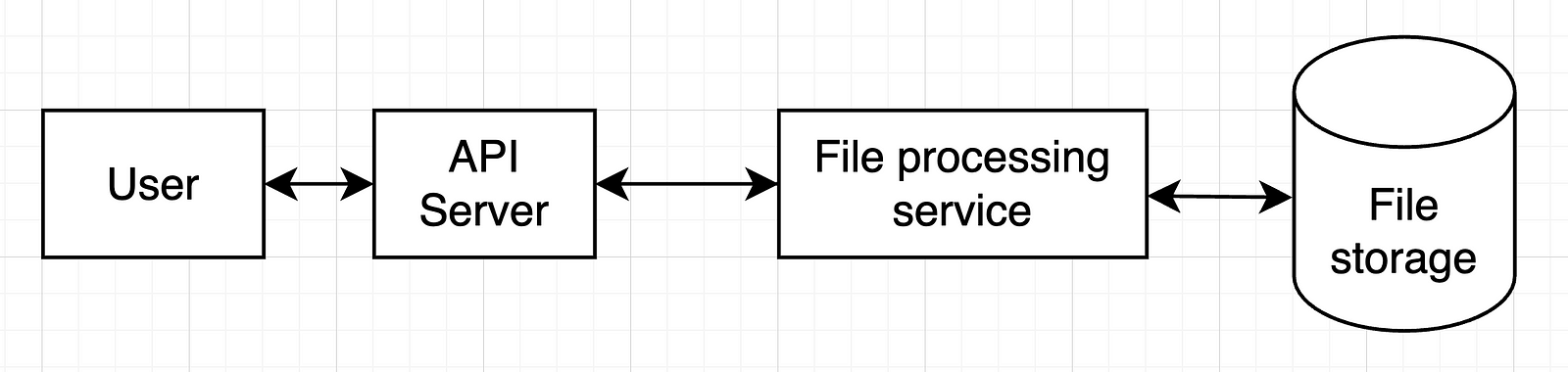
    In our example, we can start with only one service, so the whole setup would look like this:

    In a more complex system, we’d have more services and more databases.

    Check with your interviewer if they’re OK with this and move on.

    Deep dive

    Now it’s time to detail the most important components of our previous design. That’s obviously the file processing service.

    The minimal output:

    • address non-functional requirements

    But it’s also good to have these (check with the interviewer what they are expecting):

    • API detail
    • data schema detail
    • tool choices

    In our case, we should think in more detail on how those files would be processed.

    My approach here (since we’re focused on AI solutions) is to use an LLM for this:

    1. Give the LLM a “gold standard” format for our .csv files (column names and formats)
    2. Give it a sample of the file to transform too (column names and formats)
    3. Ask it for code that converts the file into the desired format
    4. Run that code on the uploaded file
    5. Store the resulting file

    With this approach in mind, we can then look back into our design and what changes we should make to it:

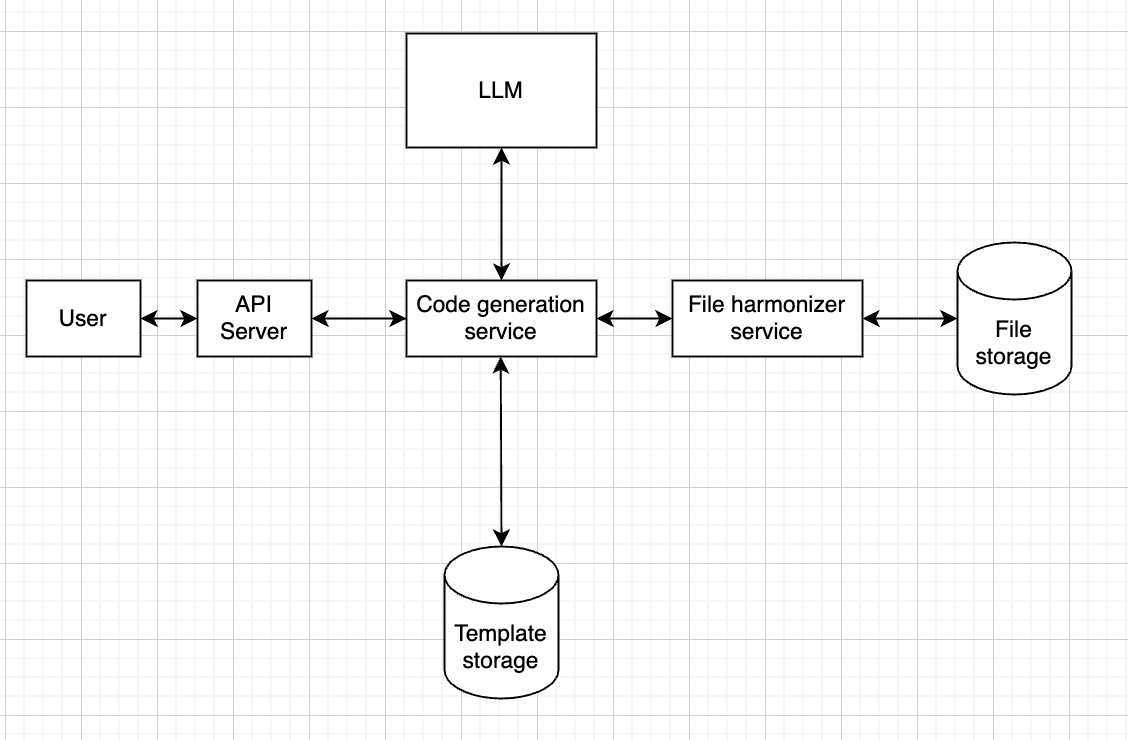
    1. We should probably separate code generation from code running, since these serve completely different purposes
    2. There might be times when we get a file schema that we’ve seen already. In that case, we can have some sort of storage that allows us to cache code used before.

    This would result in something like this:

    Meaning that the code generation service will first check in “template storage” if we have seen this format before.

    If so, it will fetch the code from that storage and send it to the file harmonizer service. 

    If not, then it will call the LLM.

    Now, one of the non-functional requirements was a latency under 1 minute.

    Given the average file sizes, it’s reasonable to assume the whole thing will take less than 1 minute to run.

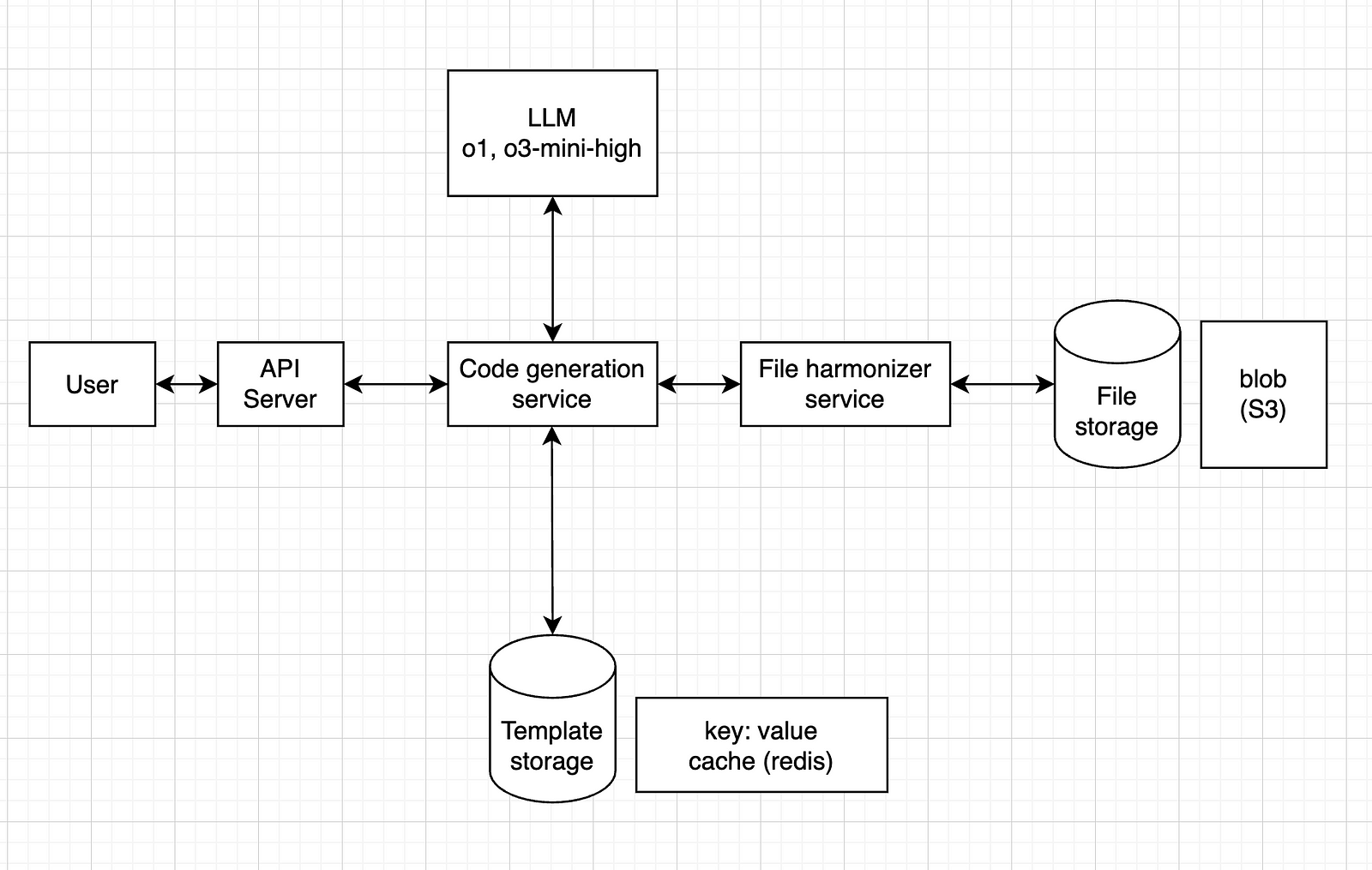
    In terms of technical choices, a few things are relevant here:

    • the type of model
    • the type of storage

    For the model, any model should do it, but I think it’s safer to go for a reasoning model, such as o1 or o3-mini-high.

    For the file storage, since it’s just .csv files, a blob storage service like Amazon S3 should work.

    For the template storage, we could have a key: value system, where the key is the schema (or a hash version of it) and the value is the corresponding code (or maybe a path to a blob storage with the .py file). One tool that can do this is Redis.

    So, our final design would look like this:

    Wrap up

    In this step, we can refine our design, or at least find improvement opportunities.

    Essentially, show what could be improved if you had more time.

    In our case, here are some examples:

    • a first iteration loop: what happens if the code fails to run? How do we call the LLM again, with the error message, to ask for new code?
    • a fallback system: if the code fails n times in a row, how can we make sure it stops trying, and gives some error message to the user, instead of running an infinite loop?
    • backup: how can we make sure our file storage has some sort of backup?
    • simultaneous requests: how can we handle cases where multiple users upload at the same time? Should we use a message queue system?

    The idea is to find bottlenecks, single points of failure and things like that, to improve on.

    Conclusion and additional resources

    I’ve seen many resources on system design interviews, and most of them are focused on software engineers, with very complex systems, addressing things that are usually not handled by AI engineers.

    Yet, when the interview is for an AI engineer role, the request can often be more like this one: instead of multiple services and use cases, a sort of linear processing system, focused on LLMs, etc.

    I’ve read two books on the topic:

    “System Design Interview” is more generic, and I found it more useful, giving an overview of how to approach these interviews.

    “Generative AI System Design Interview” is more focused on building things from scratch (LLMs, image generation models, etc.), which is not as common as using external APIs.

    If you’re more into courses, I can recommend these two:

    If you want a more detailed post on the topic, I found this one really useful:

    It goes straight to the point, with very practical advice.

    And, if you prefer video format, I did one for this tutorial as well:

    That’s it, I hope this was useful for you.

    I’m not an expert in system design, and I’m aware that the design I propose above can be improved in many ways.

    I just wanted to share what I’ve learned so far, focusing more on AI.

    Let me know in the comments if you’d do anything different, or if you see any major flaws in that design.


    Feel free to reach out to me if you would like to discuss further, it would be a pleasure (honestly):

  • How to Fine-Tune an LLM with Hugging Face + LoRA

    How to Fine-Tune an LLM with Hugging Face + LoRA

    Fine-tuning is the process of taking a pre-trained model and adjusting it on a specific dataset to specialize it for a particular task.

    Instead of training a model from scratch (which is costly and time-consuming), you leverage the general knowledge the model already has and teach it your domain-specific patterns.

    It’s like giving a well-read intern a crash course in your company’s workflow — faster, cheaper, and surprisingly effective.

    LoRA (Low-Rank Adaptation) is a clever trick that makes fine-tuning large models much more efficient.

    Instead of updating the entire model (millions or billions of parameters), LoRA inserts a few small trainable matrices into the model and only updates those during training.

    Think of it like attaching a lightweight lens to a heavy camera — you adjust the lens, not the whole system, to get the shot you want.

    Under the hood, LoRA works by decomposing weight updates into two smaller matrices with a much lower rank (hence the name).

    This dramatically reduces the number of parameters you need to train — without sacrificing performance.

    It’s a powerful way to customize large models on modest hardware, and it’s part of why AI is becoming more accessible beyond big tech labs.

    The dataset

    For this tutorial, I’ve decided to use Paul Graham’s blog to build a dataset with his essays.

    I really like his style of writing, and thought it’d be cool to have a fine-tuned model that mimics it.

    To build the dataset, I scraped his blog, then reverse-engineered the prompts that could have been used to write his essays.

    This means I gave each of his essays to ChatGPT and asked what prompt could have been used to generate it.

    This resulted in a dataset containing a prompt and an essay, which we’ll use to fine-tune our model.

    Now, let’s build!

    Tutorial

    Start by installing stuff:

    !pip install bitsandbytes
    !pip install peft
    !pip install trl
    !pip install tensorboardX
    !pip install wandb
    • bitsandbytes: efficient 8-bit optimizers for reducing memory usage during training
    • peft: lightweight fine-tuning methods like LoRA for large language models
    • trl: tools for training LLMs with reinforcement learning (e.g. PPO, DPO)
    • tensorboardX: TensorBoard support for PyTorch logging and visualization
    • wandb: experiment tracking and model monitoring with Weights & Biases

    Next, let’s preprocess our data:

    from enum import Enum
    from functools import partial
    import pandas as pd
    import torch
    import json

    from transformers import AutoModelForCausalLM, AutoTokenizer, set_seed
    from datasets import load_dataset
    from trl import SFTConfig, SFTTrainer
    from peft import LoraConfig, TaskType
    import os

    seed = 42
    set_seed(seed)

    # Put your HF Token here
    os.environ['HF_TOKEN']="<your HF token here>" # the token should have write access

    model_name = "google/gemma-3-1b-it"
    dataset_name = "arthurmello/paul-graham-essays"
    tokenizer = AutoTokenizer.from_pretrained(model_name)

    tokenizer.chat_template = "{{ bos_token }}{% if messages[0]['role'] == 'system' %}{{ raise_exception('System role not supported') }}{% endif %}{% for message in messages %}{{ '<start_of_turn>' + message['role'] + '\n' + message['content'] | trim + '<end_of_turn><eos>\n' }}{% endfor %}{% if add_generation_prompt %}{{'<start_of_turn>model\n'}}{% endif %}"
    def preprocess(sample):
    prompt = sample["prompt"]
    response = sample["response"]

    messages = [
    {"role": "user", "content": prompt},
    {"role": "assistant", "content": response}
    ]

    return {"text": tokenizer.apply_chat_template(messages, tokenize=False)}

    dataset = load_dataset(dataset_name)
    dataset = dataset.map(preprocess, remove_columns=["prompt", "response"])
    dataset = dataset["train"].train_test_split(0.1)

    Here, we set up the environment for fine-tuning a chat-style language model using LoRA and Google’s Gemma model.

    We then format the answers to have a “text” field, containing both the prompts and the responses.

    The result is a train/test split of the dataset, ready for supervised fine-tuning.

    Now, we define our tokenizer:

    model = AutoModelForCausalLM.from_pretrained(model_name,
    attn_implementation='eager',
    device_map="auto")
    model.config.use_cache = False
    model.to(torch.bfloat16)

    Here, we:

    • Load the model with attn_implementation='eager', which uses a more compatible (though sometimes slower) attention mechanism useful for certain hardware or debugging.
    • Map the model to available devices (device_map="auto"), which automatically spreads the model across CPUs/GPUs as needed based on memory availability.
    • Cast the model to bfloat16, a memory-efficient format that speeds up training/inference on supported hardware (like recent NVIDIA/TPU chips).

    Next, we set up our LoRA parameters:

    rank_dimension = 16
    lora_alpha = 64
    lora_dropout = 0.1

    peft_config = LoraConfig(r=rank_dimension,
    lora_alpha=lora_alpha,
    lora_dropout=lora_dropout,
    target_modules=[
    "q_proj", "k_proj", "v_proj",
    "o_proj", "gate_proj", "up_proj",
    "down_proj"
    ],
    task_type=TaskType.CAUSAL_LM)
    • r: rank dimension for LoRA update matrices (smaller = more compression)
    • lora_alpha: scaling factor for LoRA layers (higher = stronger adaptation)
    • lora_dropout: dropout probability for LoRA layers (helps prevent overfitting)
    • target_modules : which layers we target. You don’t need to specify those individually, you can just set it to “all_linear”. However, it can be a good exercise to experiment with different layers (to check all the available layers, run print(model))

    Next, we set up our training arguments:

    username = "arthurmello" # replace with your Hugging Face username
    output_dir = "gemma-3-1b-it-paul-graham"
    per_device_train_batch_size = 1
    per_device_eval_batch_size = 1
    gradient_accumulation_steps = 4
    learning_rate = 1e-4

    num_train_epochs=10
    warmup_ratio = 0.1
    lr_scheduler_type = "cosine"
    max_seq_length = 1500

    training_arguments = SFTConfig(
    output_dir=output_dir,
    per_device_train_batch_size=per_device_train_batch_size,
    per_device_eval_batch_size=per_device_eval_batch_size,
    gradient_accumulation_steps=gradient_accumulation_steps,
    save_strategy="no",
    eval_strategy="epoch",
    logging_steps=logging_steps,
    learning_rate=learning_rate,
    max_grad_norm=max_grad_norm,
    weight_decay=0.1,
    warmup_ratio=warmup_ratio,
    lr_scheduler_type=lr_scheduler_type,
    report_to="tensorboard",
    bf16=True,
    hub_private_repo=False,
    push_to_hub=True,
    num_train_epochs=num_train_epochs,
    gradient_checkpointing=True,
    gradient_checkpointing_kwargs={"use_reentrant": False},
    packing=False,
    max_seq_length=max_seq_length,
    )

    Here, we set:

    • per_device_train_batch_size and per_device_eval_batch_size set how many samples are processed per device at each step for training and evaluation, respectively.
    • gradient_accumulation_steps allows effective batch sizes larger than memory limits by accumulating gradients over multiple steps.
    • learning_rate sets the starting learning rate for model optimization.
    • num_train_epochs defines how many times the model will see the full training dataset.
    • warmup_ratio gradually increases the learning rate during the first part of training to help stabilize early learning.
    • lr_scheduler_type="cosine" uses a cosine decay schedule to adjust the learning rate over time.
    • max_seq_length defines the maximum number of tokens per training sequence.

    Finally, we train our model:

    trainer = SFTTrainer(
    model=model,
    args=training_arguments,
    train_dataset=dataset["train"],
    eval_dataset=dataset["test"],
    processing_class=tokenizer,
    peft_config=peft_config,
    )

    trainer.train()

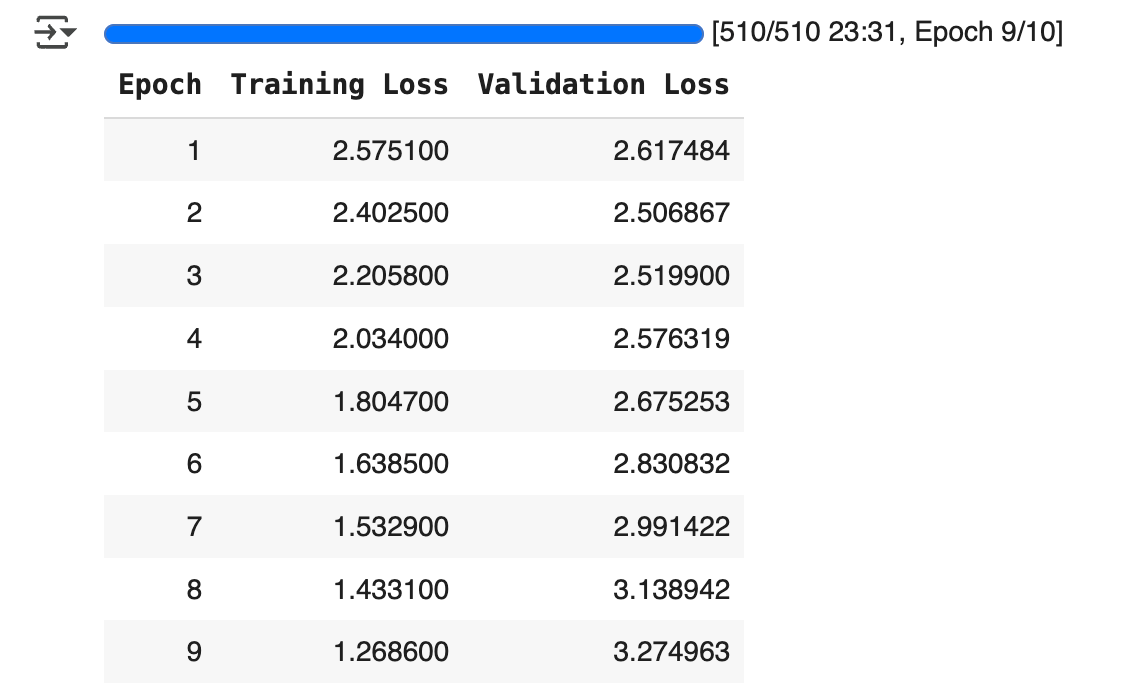
    Here, you should see something that looks like this:

    This shows the training and validation loss for each epoch.

    If training loss decreases and validation loss increases, this indicates overfitting (which we can see here around epoch 3).

    Some strategies to adress overfitting include:

    • reducing learning_rate
    • increasing lora_dropout
    • reducing num_train_epochs

    Once you’re satisfied with the training results, you can compare your model’s output with the base model’s:

    base_model = AutoModelForCausalLM.from_pretrained(model_name).to(torch.bfloat16)
    base_tokenizer = AutoTokenizer.from_pretrained(model_name)

    fine_tuned_model = model
    fine_tuned_tokenizer = tokenizer

    # Example input prompt
    prompt = "<start_of_turn>user\Write an essay on the future of AI<end_of_turn><eos>\n<start_of_turn>model\n"

    # Inference helper
    def generate(model, tokenizer, prompt):
    device=model.device
    inputs = tokenizer(prompt, return_tensors="pt").to(device)
    output = model.generate(**inputs)
    return tokenizer.decode(output[0], skip_special_tokens=True)

    print("=== Base Model Output ===")
    print(generate(base_model, base_tokenizer, prompt))

    print("\n=== Fine-Tuned Model Output ===")
    print(generate(fine_tuned_model, fine_tuned_tokenizer, prompt))

    There you go, now you have your own fine-tuned model to replicate Paul Graham’s style!

    If you set push_to_hub=True in SFTConfig , you can call your fine-tuned model anytime, using your own username and output_id :

    model = AutoModelForCausalLM.from_pretrained(
    "arthurmello/gemma-3-1b-it-paul-graham")

    And, of course, you can adapt this approach to fine-tune LLMs for other use cases!

    A video version of this tutorial is available here:


    Feel free to reach out to me if you would like to discuss further, it would be a pleasure (honestly):

  • Build a Neural Network From Scratch – in Less Than 5 minutes

    Build a Neural Network From Scratch – in Less Than 5 minutes

    No TensorFlow. No PyTorch. Just you, NumPy, and 20-ish lines of code.

    We’re going straight to the core: how a neural network actually learns — and we’ll teach it the classic XOR problem.

    The Problem: XOR

    We want this network to learn the XOR rule:

    0 XOR 0 = 0  
    0 XOR 1 = 1  
    1 XOR 0 = 1  
    1 XOR 1 = 0

    If A or B are equal to 1, then the output is equal to 1… unless they are both equal to 1, in which case the output is 0.

    It’s a simple pattern… that isn’t linearly separable. A single-layer perceptron fails here. But with one hidden layer, it works.

    Step 1: Setup and architecture

    Let’s define our data and our tiny network.

    import numpy as np
    
    # XOR input and labels
    X = np.array([[0,0],[0,1],[1,0],[1,1]])
    y = np.array([[0],[1],[1],[0]])
    
    # Define network architecture
    input_size = 2
    hidden_size = 4
    output_size = 1
    

    We’ve got:

    • 2 input features (x1, x2)
    • 4 neurons in the hidden layer
    • 1 output (for binary classification)

    Step 2: Initialize weights

    Random weights, zero biases. Simple and effective.

    np.random.seed(1)
    W1 = np.random.randn(input_size, hidden_size)
    b1 = np.zeros((1, hidden_size))
    W2 = np.random.randn(hidden_size, output_size)
    b2 = np.zeros((1, output_size))
    

    We’ll learn these weights as we train.

    Step 3: Activation functions

    We’ll use sigmoid for both layers — good enough for this toy example.

    def sigmoid(z): return 1 / (1 + np.exp(-z))
    def sigmoid_deriv(a): return a * (1 - a)
    

    sigmoid_deriv is the derivative — it tells us how much to adjust during backprop.

    Step 4: Train it

    Here’s the full training loop. Forward pass, backprop, and gradient descent.

    learning_rate = 0.1
    epochs = 1000
    
    for epoch in range(epochs):
        # Forward pass
        A1 = sigmoid(X @ W1 + b1)      # hidden layer
        A2 = sigmoid(A1 @ W2 + b2)     # output layer
    
        # Backpropagation (compute gradients)
        dA2 = (A2 - y) * sigmoid_deriv(A2)
        dA1 = dA2 @ W2.T * sigmoid_deriv(A1)
    
        # Gradient descent (update weights and biases)
        W2 -= learning_rate * A1.T @ dA2
        b2 -= learning_rate * np.sum(dA2, axis=0, keepdims=True)
        W1 -= learning_rate * X.T @ dA1
        b1 -= learning_rate * np.sum(dA1, axis=0, keepdims=True)
    

    This is the heart of every neural net:

    • Forward pass: make a guess
    • Backward pass: see how wrong you were
    • Update: adjust weights to do better next time

    Step 5: Make predictions

    Let’s see if it learned XOR.

    preds = sigmoid(sigmoid(X @ W1 + b1) @ W2 + b2) > 0.5
    
    print("Predictions:\n", preds.astype(int))
    

    Output:

    [[0]
     [1]
     [1]
     [0]]

    It works!

    Where to go from here

    You just built a functioning neural network from scratch.

    Here’s what you can try next:

    • Replace sigmoid with ReLU in the hidden layer
    • Add a second hidden layer
    • Swap out the loss function for cross-entropy
    • Wrap this into a class and build your own mini framework

    Final words

    Learning how this stuff works under the hood is powerful.

    You’ll never look at TensorFlow or PyTorch the same again.

    No magic.
    Just math.
    Just code.

    Here’s a video version of this tutorial:

  • How to Build a Chatbot with Python

    How to Build a Chatbot with Python


    A no-BS guide for complete beginners

    Chatbots are becoming more powerful and accessible than ever. In this tutorial, you’ll learn how to build a simple chatbot using Streamlit and OpenAI’s API in just a few minutes.

    Prerequisites

    Before we start coding, make sure you have the following:

    • Python installed on your computer
    • A code editor (I recommend Cursor, but you can use VS Code, PyCharm, etc.)
    • An OpenAI API key (we’ll generate one shortly)
    • A GitHub account (for deployment)

    Step 1: Setting Up the Project

    We’ll use Poetry for dependency management. It simplifies package installation and versioning.

    Initialize the Project

    Open your terminal and run:

    # Initialize a new Poetry project
    poetry init
    
    # Create a virtual environment and activate it
    poetry shell

    Install Dependencies

    Next, install the required packages:

    poetry add streamlit openai

    Set Up OpenAI API Key

    Go to OpenAI and get your API key. Then, create a .streamlit/secrets.toml file and add:

    OPENAI_API_KEY="your-openai-api-key"
    

    Make sure to never expose this key in public repositories!

    Step 2: Creating the Chat Interface

    Now, let’s build our chatbot’s UI. Create a new folder: streamlit-chatbot, and add a file to it, called app.py with the following code:

    import streamlit as st
    from openai import OpenAI
    
    # Access the API key from Streamlit secrets
    api_key = st.secrets["OPENAI_API_KEY"]
    client = OpenAI(api_key=api_key)
    st.title("Simple Chatbot")
    
    # Initialize chat history
    if "messages" not in st.session_state:
        st.session_state.messages = []
    
    # Display previous chat messages
    for message in st.session_state.messages:
        with st.chat_message(message["role"]):
            st.markdown(message["content"])
    
    # Chat input
    if prompt := st.chat_input("What's on your mind?"):
        st.session_state.messages.append(
           {"role": "user", "content": prompt}
        )
        with st.chat_message("user"):
            st.markdown(prompt)
    

    This creates a simple UI where:

    • The chatbot maintains a conversation history.
    • Users can type their messages into an input field.
    • Messages are displayed dynamically.

    Step 3: Integrating OpenAI API

    Now, let’s add the AI response logic:

    # Get assistant response
        with st.chat_message("assistant"):
            response = client.chat.completions.create(
                model="gpt-3.5-turbo",
                messages=[
                  {"role": m["role"],
                   "content": m["content"]} for m in st.session_state.messages
                ])
            assistant_response = response.choices[0].message.content
            st.markdown(assistant_response)
    
        # Add assistant response to chat history
        st.session_state.messages.append({"role": "assistant", "content": assistant_response})
    

    This code:

    • Sends the conversation history to OpenAI’s GPT-3.5-Turbo model.
    • Retrieves and displays the assistant’s response.
    • Saves the response in the chat history.

    Step 4: Deploying the Chatbot

    Let’s make our chatbot accessible online by deploying it to Streamlit Cloud.

    Initialize Git and Push to GitHub

    Run these commands in your project folder:

    git init
    git add .
    git commit -m "Initial commit"

    Create a new repository on GitHub and do not initialize it with a README. Then, push your code:

    git remote add origin <https://github.com/your-username/your-repo.git>
    
    git push -u origin master

    Deploy on Streamlit Cloud

    1. Go to Streamlit Cloud.
    2. Click New app, connect your GitHub repository, and select app.py.
    3. In Advanced settings, add your OpenAI API key in Secrets.
    4. Click Deploy and your chatbot will be live! 🚀

    Conclusion

    Congratulations, you’ve built and deployed a chatbot using Streamlit and OpenAI. This is just the beginning — here are some ideas to improve it:

    • Add error handling for API failures.
    • Use different GPT models for varied responses.
    • Allow users to clear chat history.
    • Integrate RAG into it

    I hope you enjoyed this tutorial! If you found it helpful, feel free to share it.

    The full code is available here.


    Feel free to reach out to me if you would like to discuss further, it would be a pleasure (honestly):

    LinkedIn